Connecting AWS and Alibaba Cloud with Site-to-Site IPsec VPN, BGP and a Transit Router
Hi! (^-^)/ Many companies don't live in one cloud. An app may run on AWS while its database, its users or a partner sit on Alibaba Cloud. The two networks then need to talk privately: server to server, over private IPs, encrypted, without opening anything to the internet.
In this lab I connected an AWS VPC in N. Virginia to an Alibaba Cloud VPC in Riyadh with a site-to-site IPsec VPN using BGP. On the Alibaba side the VPN goes through a CEN Transit Router, with a Cloud Firewall inspecting the traffic. At the end, an EC2 instance and an ECS instance can ping and SSH each other over their private IPs.
This article walks through every step with screenshots, the IP plan, the route tables, and, most important, the problems I hit and how I fixed them.
The services on each side
Alibaba Cloud (SAU Riyadh, me-central-1)
VPC with two vSwitches (Zone A and Zone B)
CEN (Cloud Enterprise Network) with a Transit Router (TR)
VPN: customer gateways and an IPsec connection created through the TR
IPsec logs: essential for troubleshooting
Cloud Firewall: a VPC firewall (east-west) on the Transit Router
ECS: one instance to test ping and SSH
AWS (US East, N. Virginia, us-east-1)
VPC with a private subnet
Virtual private gateway (VGW)
Customer gateway and Site-to-Site VPN connection (IPsec)
CloudWatch Logs: tunnel and BGP logs for troubleshooting
EC2: one instance with no public IP, to test the connection
Architecture
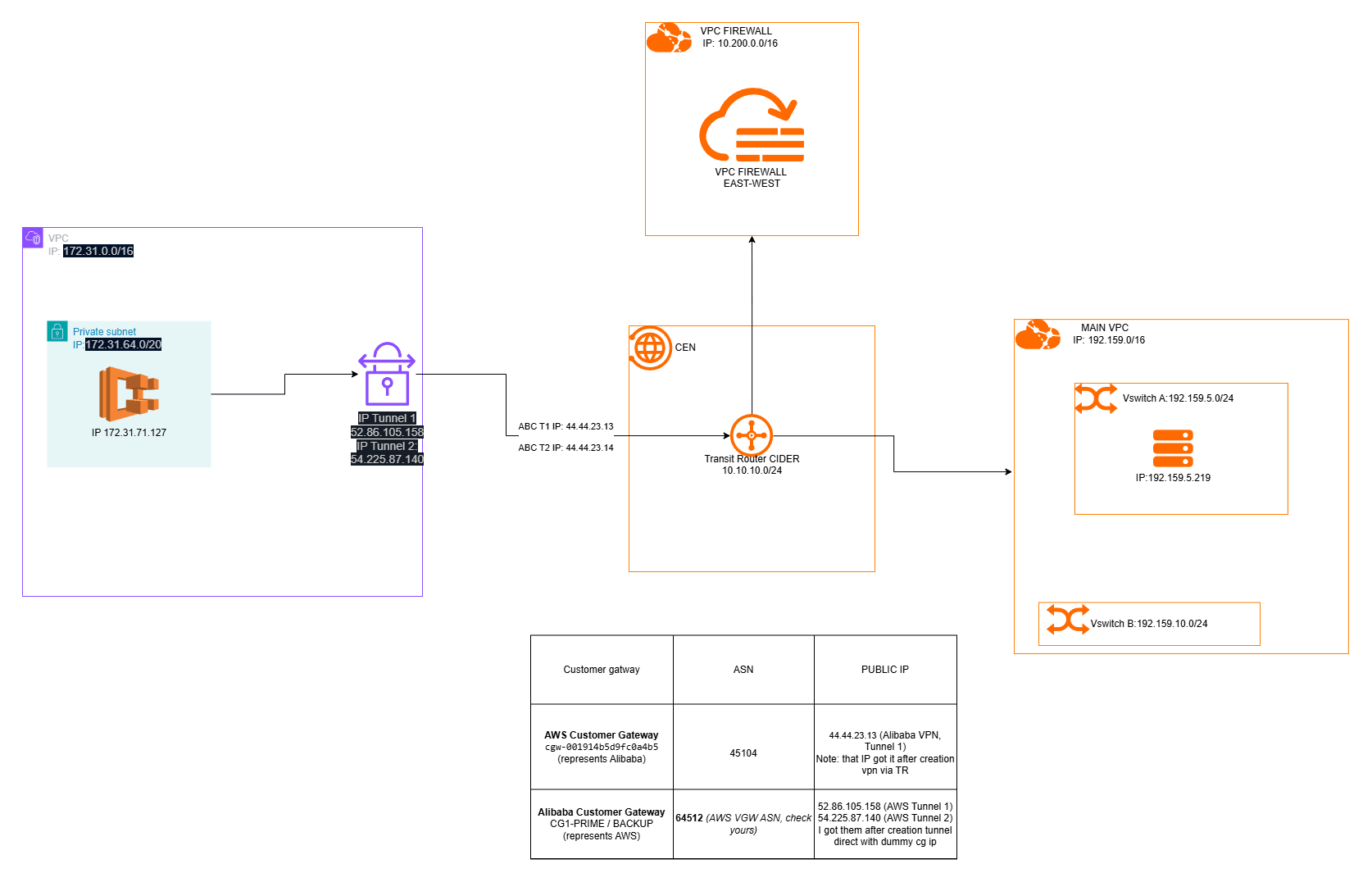
Architecture: the AWS VPC with an EC2 in a private subnet connects through two IPsec tunnels to the Alibaba Cloud CEN Transit Router, which reaches the main VPC and passes through a VPC firewall
The diagram is also available as an editable draw.io file:
Traffic goes from the EC2 in AWS, through the VGW and an IPsec tunnel over the internet, into the Alibaba Transit Router. The Transit Router sends it through the VPC firewall and then into the main VPC, where the ECS lives.
The IP plan
Note: the Alibaba Cloud public IPs in this article and its screenshots are replaced with example IPs (44.44.23.x). Use your own gateway IPs.
Plan this before you click anything. Overlapping ranges are the number one reason a VPN "works" but traffic doesn't.
Network
CIDR / IP
Notes
AWS VPC
172.31.0.0/16
N. Virginia
AWS private subnet
172.31.64.0/20
AWS EC2
172.31.71.127
t3.micro, Ubuntu, no public IP
Alibaba main VPC
192.159.0.0/16
Riyadh
vSwitch A (Zone A)
192.159.5.0/24
vSwitch B (Zone B)
192.159.10.0/24
Alibaba ECS
192.159.5.219
in vSwitch A
Transit Router CIDR
10.10.10.0/24
used for VPN attachment addresses
VPC firewall CIDR
10.200.0.0/16
created by Cloud Firewall
BGP inside tunnel 1
169.254.10.0/30
AWS .1, Alibaba .2
BGP inside tunnel 2
169.254.20.0/30 (Alibaba side)
see troubleshooting
Lesson:192.159.x.x is a public range, not a private one. It worked in this lab, but for real networks use RFC 1918 private ranges (10.0.0.0/8, 172.16.0.0/12, 192.168.0.0/16) that don't overlap between the two clouds.
Gateways, ASNs and public IPs
A customer gateway always represents the other side:
Customer gateway
Represents
ASN
Public IP
AWS customer gateway
Alibaba
45104
44.44.23.13 (Alibaba VPN, tunnel 1)
Alibaba customer gateway CG1-PRIME
AWS tunnel 1
64512 (AWS VGW default ASN)
52.86.105.158
Alibaba customer gateway BACKUP
AWS tunnel 2
64512
54.225.87.140
The key ideas in plain words
Site-to-site VPN: a permanent, encrypted link between two networks, not between one laptop and a network.
IPsec: the protocol suite that encrypts and authenticates the traffic. See What is IPsec?
IKE (Internet Key Exchange): how the two ends agree on keys. Phase 1 builds a secure channel between the gateways. Phase 2 builds the tunnels that carry your data. Both phases must use matching settings on both sides.
Pre-shared key (PSK): a shared password that proves each gateway is who it says it is. It must match character for character. Never publish it.
ASN (Autonomous System Number): an ID for each side's network in BGP. The two sides must use different ASNs.
BGP: the protocol the two sides use to tell each other which networks they have, so routes are learned automatically instead of typed by hand.
Virtual private gateway (VGW): the VPN endpoint on the AWS side, attached to the VPC.
Customer gateway (CGW): a record that describes the other side's VPN device: its public IP and ASN.
CEN and Transit Router (TR): Alibaba's cloud router. It connects VPCs, VPNs and regions, and decides where traffic goes with route tables.
NAT-T and DPD: NAT traversal wraps IPsec in UDP 4500 so it passes through NAT. Dead Peer Detection checks that the other side is still alive.
Why I used a Transit Router instead of attaching the VPN directly to the VPC
Alibaba Cloud can also terminate an IPsec VPN on a VPN gateway that belongs to a single VPC. I chose the CEN Transit Router because:
It is a hub. One VPN to AWS can reach many VPCs, and other regions through CEN, without building a new VPN for each VPC.
Routes are learned automatically. Routes learned over BGP from AWS are propagated into the TR route table, and the VPC routes are propagated the other way.
Cloud Firewall can inspect the traffic. A VPC firewall sits on the Transit Router, so traffic between AWS and the VPC is checked (ACL and IPS) without changing the VPCs.
It scales and stays clean. Adding VPCs, VBRs (Express Connect) or more VPNs later means adding attachments, not redesigning the network.
Step 1 (AWS): Create a virtual private gateway
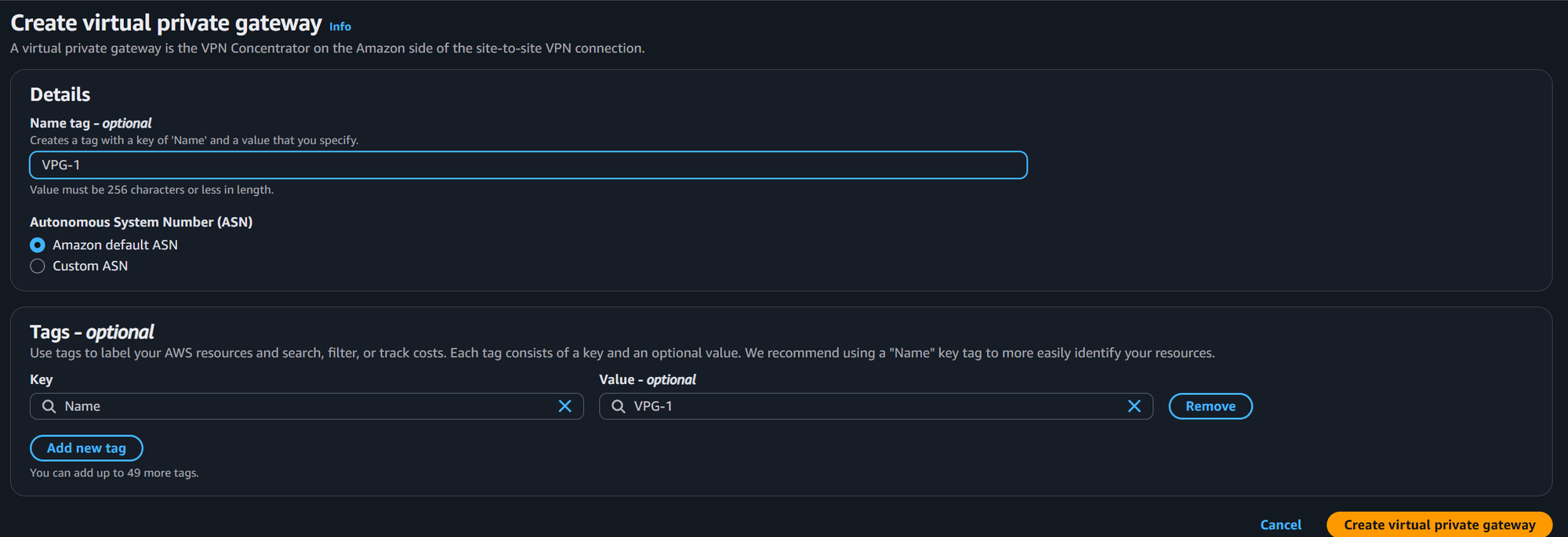
In the VPC console, create a virtual private gateway with the Amazon default ASN (64512), then attach it to your VPC.
Creating the AWS virtual private gateway VPG-1 with the Amazon default ASN
Step 2 (AWS): Create a customer gateway
The chicken-and-egg problem: each side needs the other side's public IP. AWS only gives you its tunnel IPs after you create the VPN connection, and the VPN connection needs a customer gateway. Alibaba only gives you its VPN IPs after you create the IPsec connection, which needs the AWS IPs.
My solution:
Create a placeholder customer gateway in AWS first (any valid public IP), just to create the VPN connection and get the AWS tunnel IPs.
Create the Alibaba side with those AWS IPs, and get Alibaba's VPN IPs.
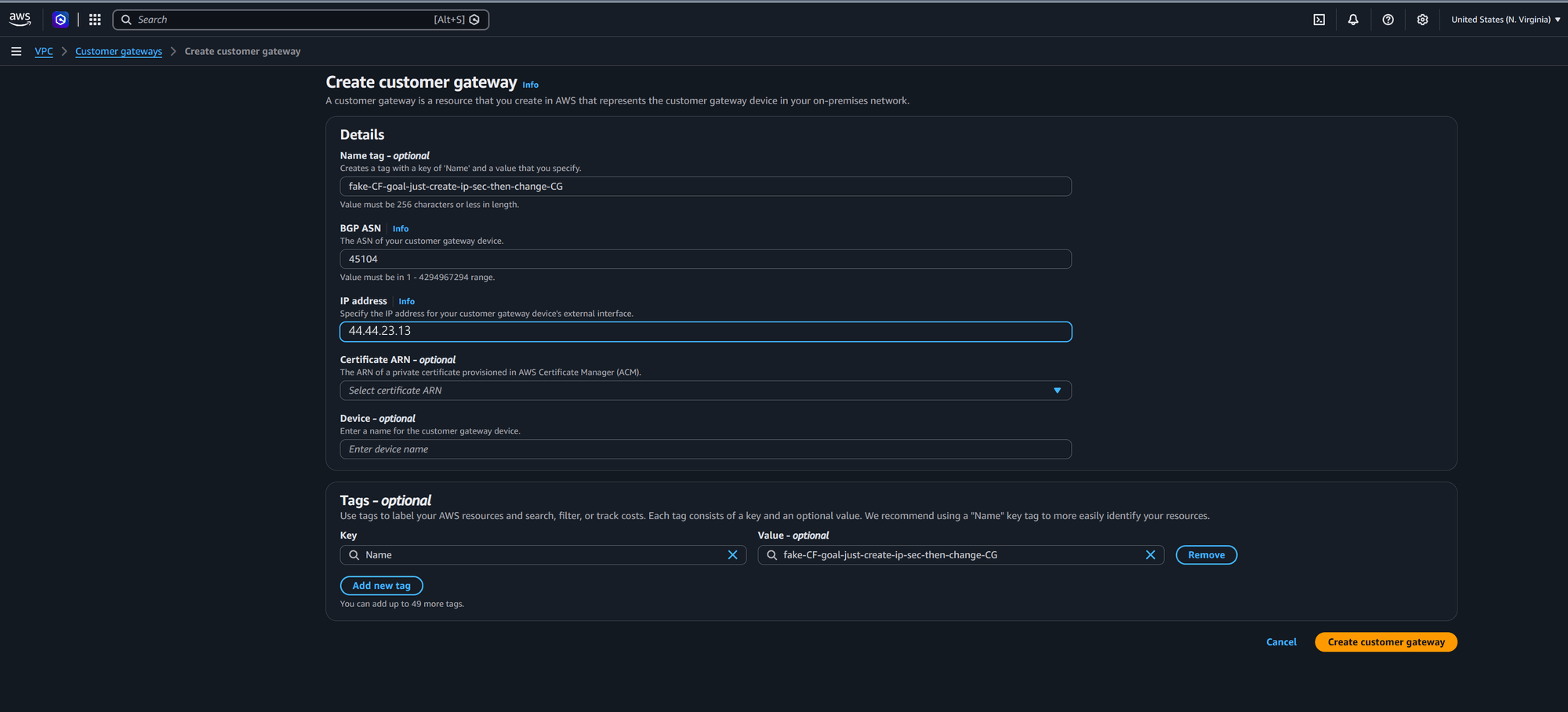
Come back and create the real AWS customer gateway with Alibaba's IP and ASN 45104, then switch the VPN connection to it.
Creating the AWS customer gateway with BGP ASN 45104 and Alibaba's VPN IP 44.44.23.13
Step 3 (AWS): Create the Site-to-Site VPN connection
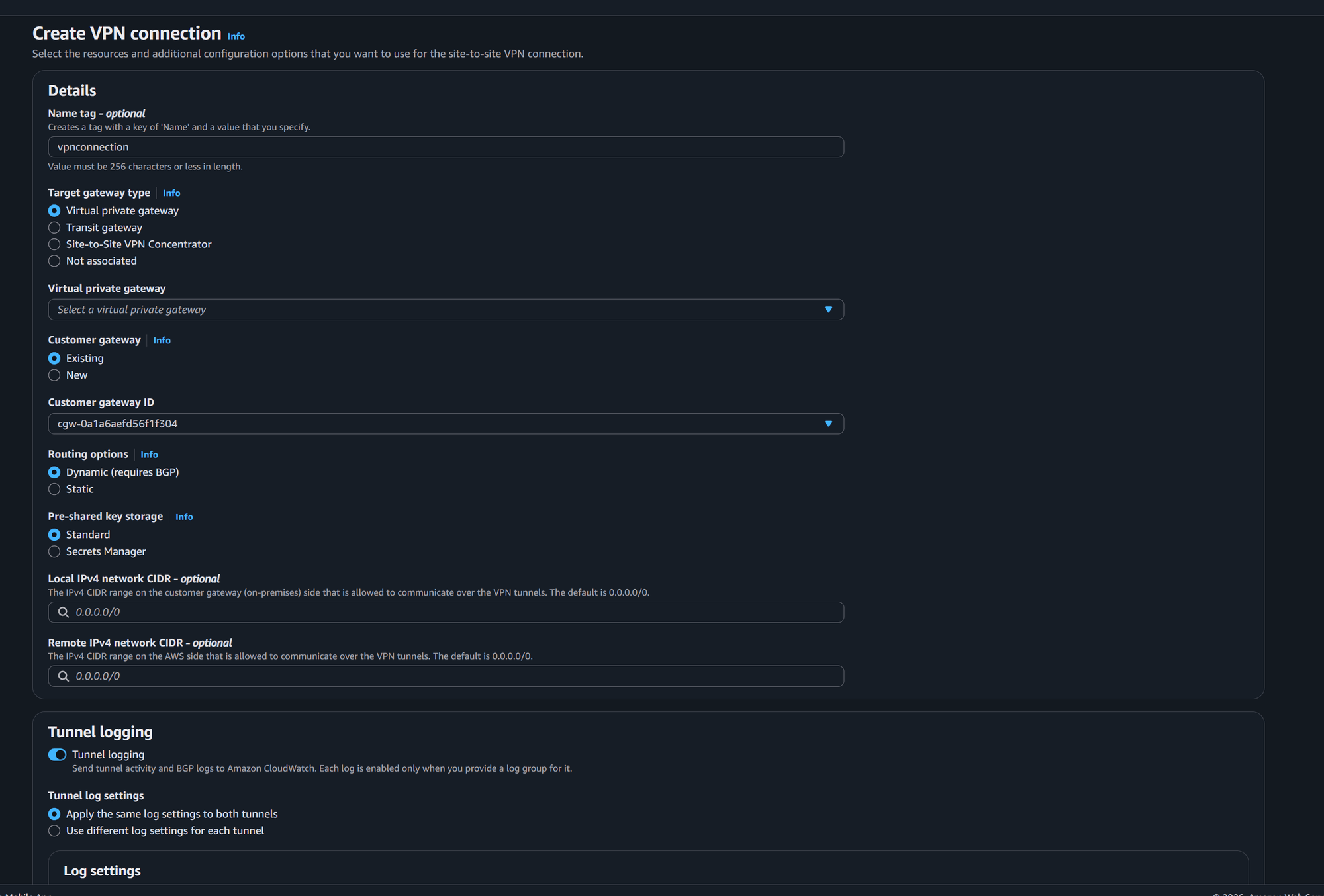
Create the VPN connection with:
Target gateway type: Virtual private gateway (the one from step 1)
Customer gateway: existing (from step 2)
Routing options:Dynamic (requires BGP)
Pre-shared key storage: Standard
Local and remote IPv4 CIDR: leave the default 0.0.0.0/0
Tunnel logging:on, sending tunnel and BGP logs to CloudWatch. You will need these logs.
In the tunnel options, set tunnel 1's inside CIDR to 169.254.10.0/30.
Creating the AWS VPN connection with dynamic BGP routing and tunnel logging enabled
When it is created, note the outside IPs of the two AWS tunnels (52.86.105.158 and 54.225.87.140), and download the configuration file (Generic or Strongswan). It contains the PSK and IKE settings for each tunnel. Copy values from it, don't retype them.
Step 4 (Alibaba): Create the customer gateways
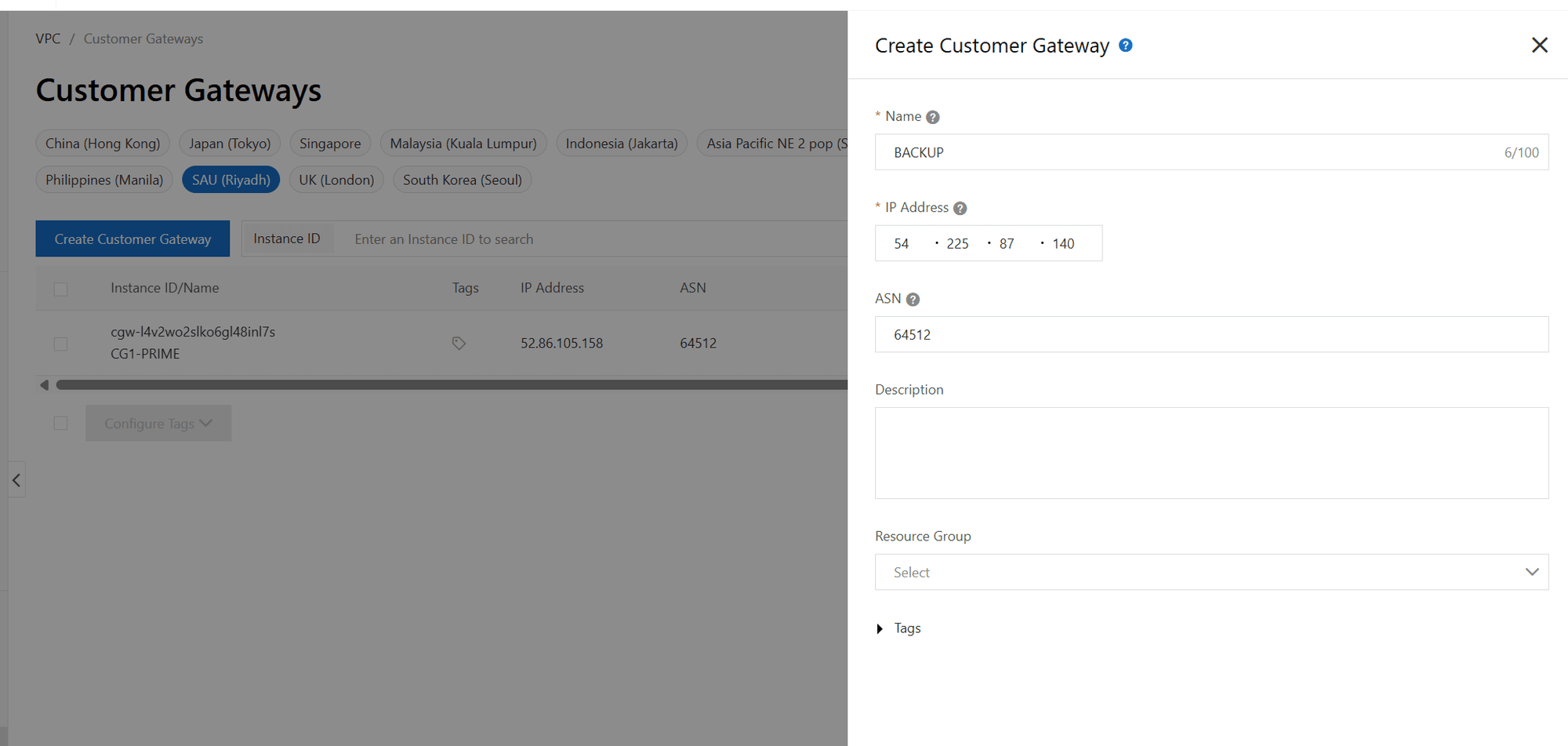
In the Alibaba VPN console, create one customer gateway per AWS tunnel, both with ASN 64512:
CG1-PRIME: 52.86.105.158 (AWS tunnel 1)
BACKUP: 54.225.87.140 (AWS tunnel 2)
Creating the Alibaba customer gateway BACKUP with AWS tunnel 2's IP and ASN 64512
Step 5 (Alibaba): Create the CEN Transit Router
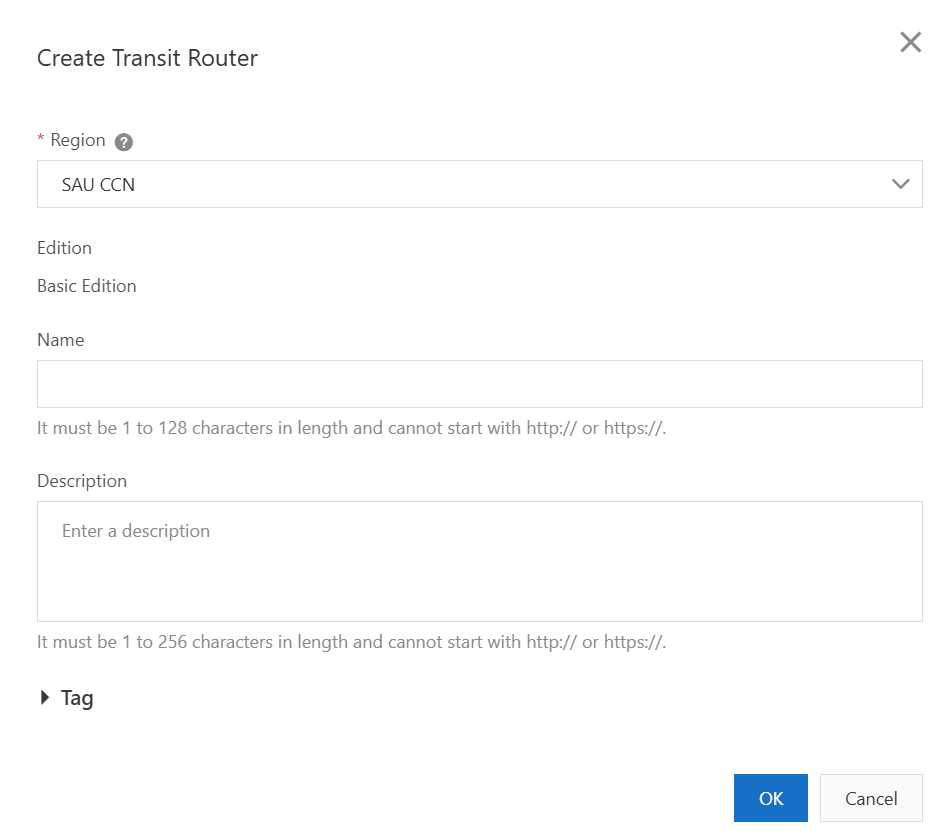
Create a CEN instance, then a Transit Router in the same region as your VPC (Riyadh).
Creating the Transit Router in SAU Riyadh
Step 6 (Alibaba): Give the Transit Router a CIDR
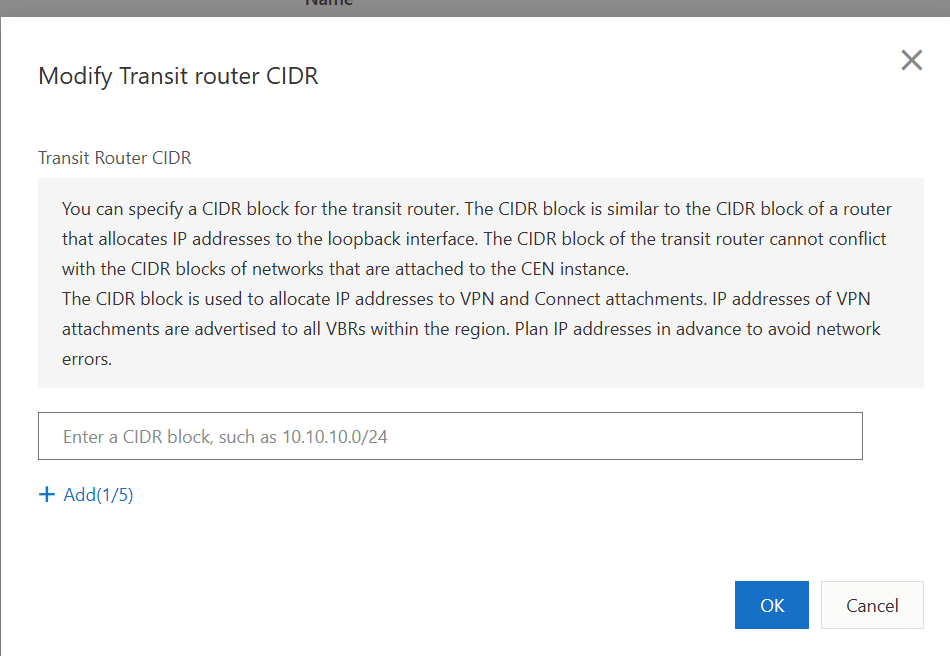
The TR needs its own CIDR block to assign addresses to VPN attachments. It must not overlap any network attached to the CEN. I used 10.10.10.0/24.
Setting the Transit Router CIDR to 10.10.10.0/24
Step 7 (Alibaba): Create the IPsec connection through the Transit Router
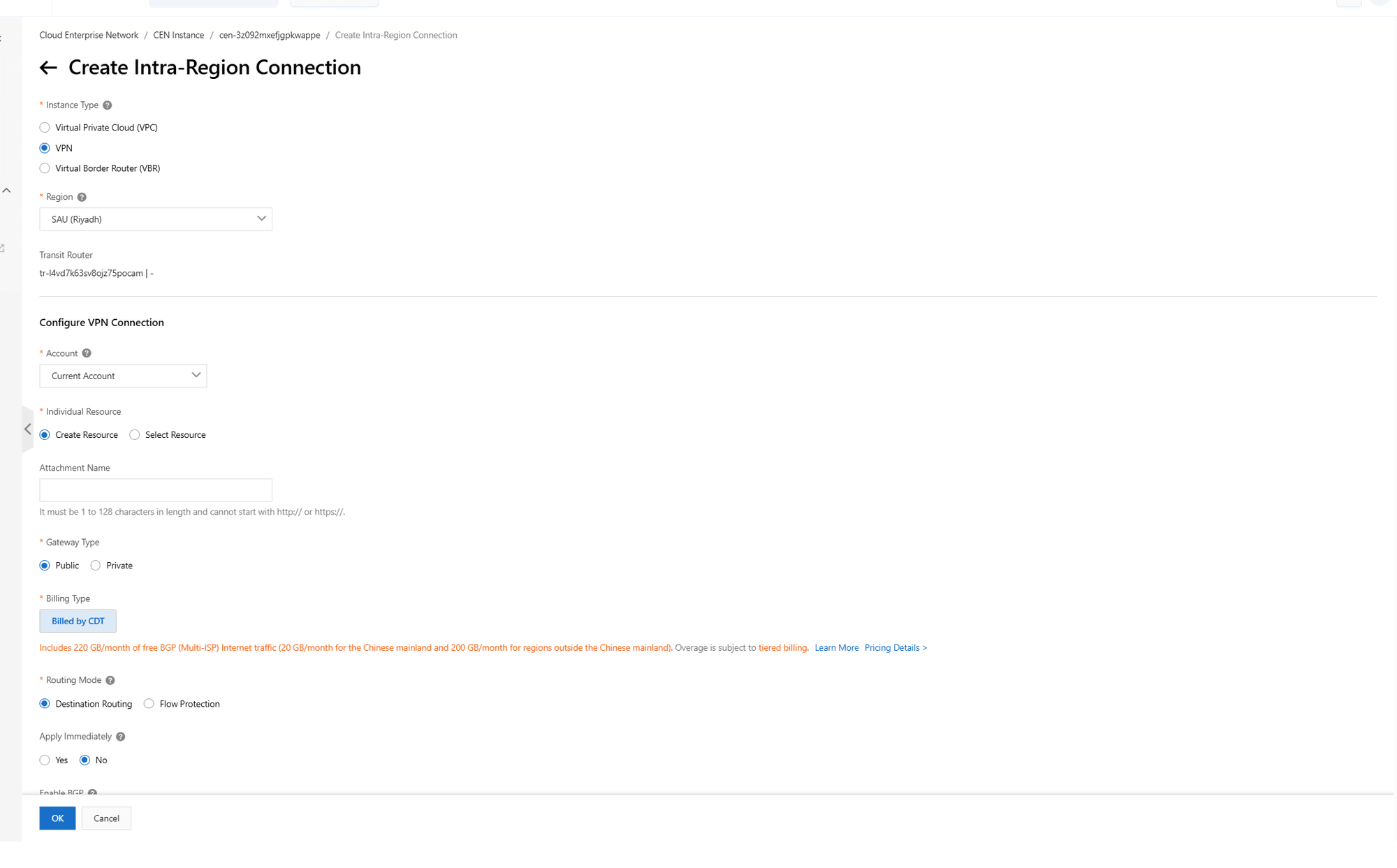
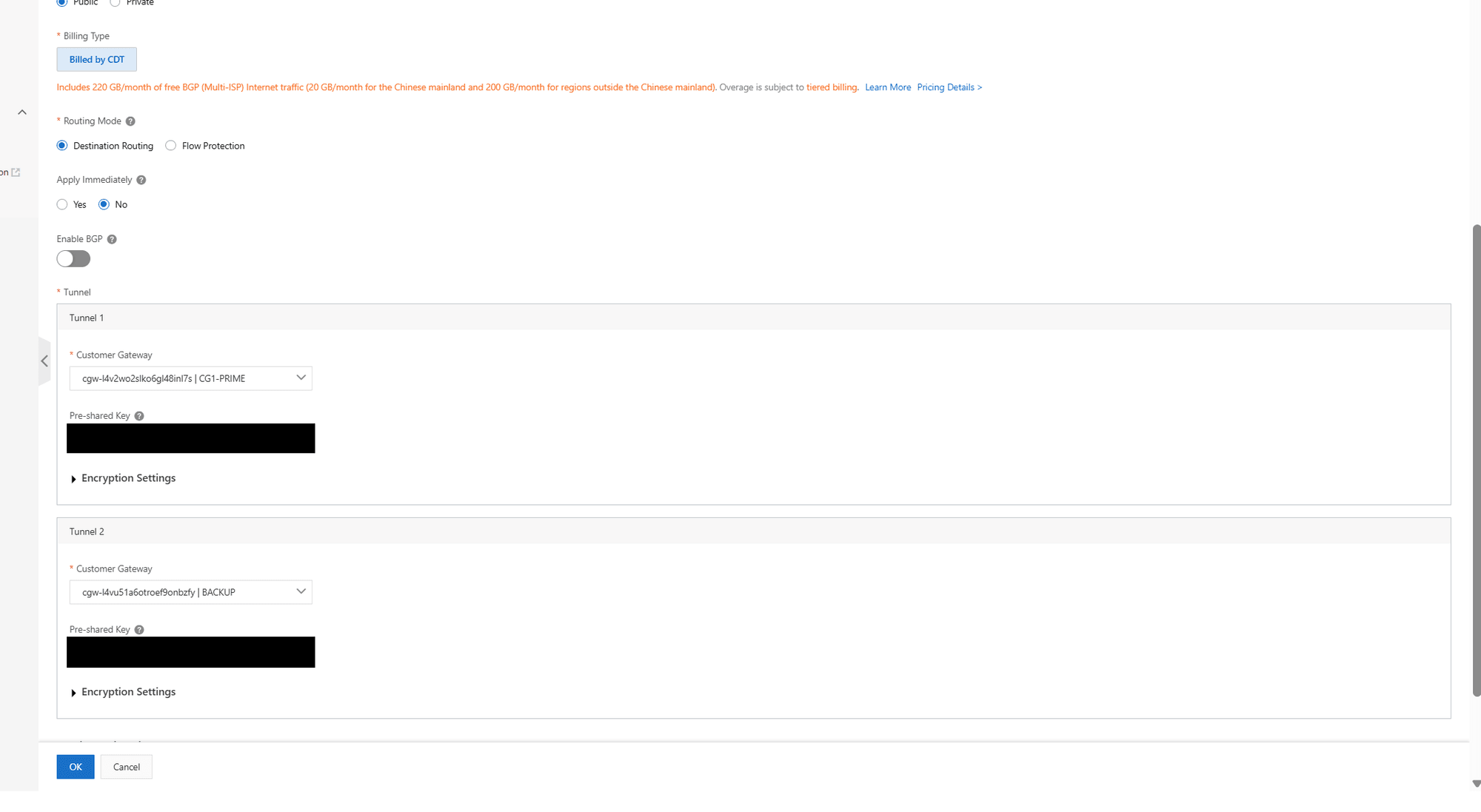
In the CEN instance, Create Intra-Region Connection with Instance Type: VPN. Choose Create Resource, Gateway Type: Public and Routing Mode: Destination Routing.
Creating an intra-region VPN connection on the Transit Router
Then fill in the two tunnels:
Tunnel 1: customer gateway CG1-PRIME, with the PSK of AWS tunnel 1
Tunnel 2: customer gateway BACKUP, with the PSK of AWS tunnel 2
Encryption settings: match the AWS configuration file exactly (IKE version, encryption, integrity, DH group, lifetimes)
Tunnel settings: each tunnel points to its AWS customer gateway with its own pre-shared key (keys hidden)
When it is created, Alibaba shows its gateway IPs: 44.44.23.13 for tunnel 1 and 44.44.23.14 for tunnel 2. Now go back to AWS and finish step 2 with the real IP.
Troubleshooting: right after creating the IPsec connection
Phase 1 negotiations failed: the PSK or the IKE settings don't match. AWS has a different PSK for each tunnel, so make sure tunnel 1's key goes to Alibaba tunnel 1 and tunnel 2's to tunnel 2. Check the IKE version (IKEv2 is recommended), encryption (AES128/AES256), integrity (SHA1/SHA256), DH group and lifetime (AWS default for phase 1 is 28800 seconds).
Peer IPs are wrong: each side must point to the other side's exact public IP. A placeholder CGW left in place means phase 1 never starts.
The AWS customer gateway can't be edited. To change its IP or ASN, create a new CGW and use Modify VPN connection to switch to it.
Traffic is blocked on the way: NAT-T uses UDP 4500 and IKE uses UDP 500. Both must be allowed.
Step 8 (Alibaba): Attach the VPC to the Transit Router
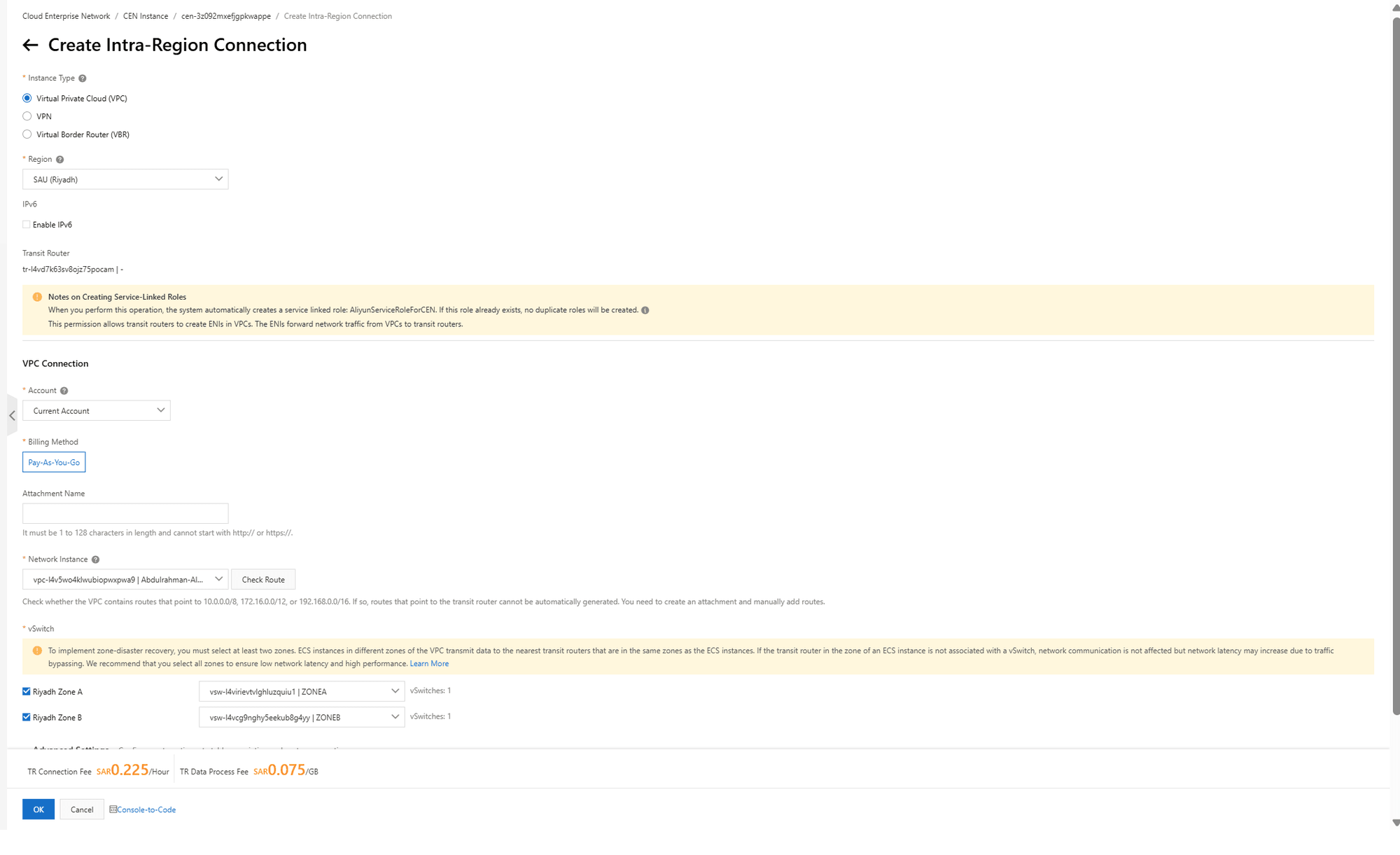
Create another intra-region connection, this time with Instance Type: VPC. Pick your VPC and select a vSwitch in at least two zones (Zone A and Zone B) for high availability.
Attaching the VPC to the Transit Router with vSwitches in Zone A and Zone B
The console warns that if the VPC already has routes for 10.0.0.0/8, 172.16.0.0/12 or 192.168.0.0/16, the routes to the TR can't be added automatically. In that case you add them by hand (see step 10).
Step 9: Enable BGP and bring the tunnels up
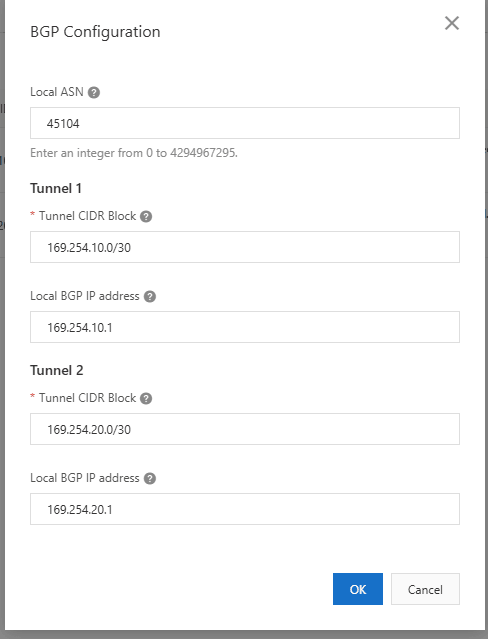
On the Alibaba IPsec connection, enable BGP:
Local ASN:45104
Tunnel 1: CIDR 169.254.10.0/30, local BGP IP 169.254.10.2
Tunnel 2: CIDR 169.254.20.0/30, local BGP IP 169.254.20.2
Alibaba BGP configuration: local ASN 45104 and a /30 tunnel CIDR for each tunnel
Watch the BGP IPs. In this screenshot I first used .1 for Alibaba. That was wrong: AWS always takes the first usable IP (.1) of the /30, so the customer side must use .2.
What went wrong, and how I fixed it
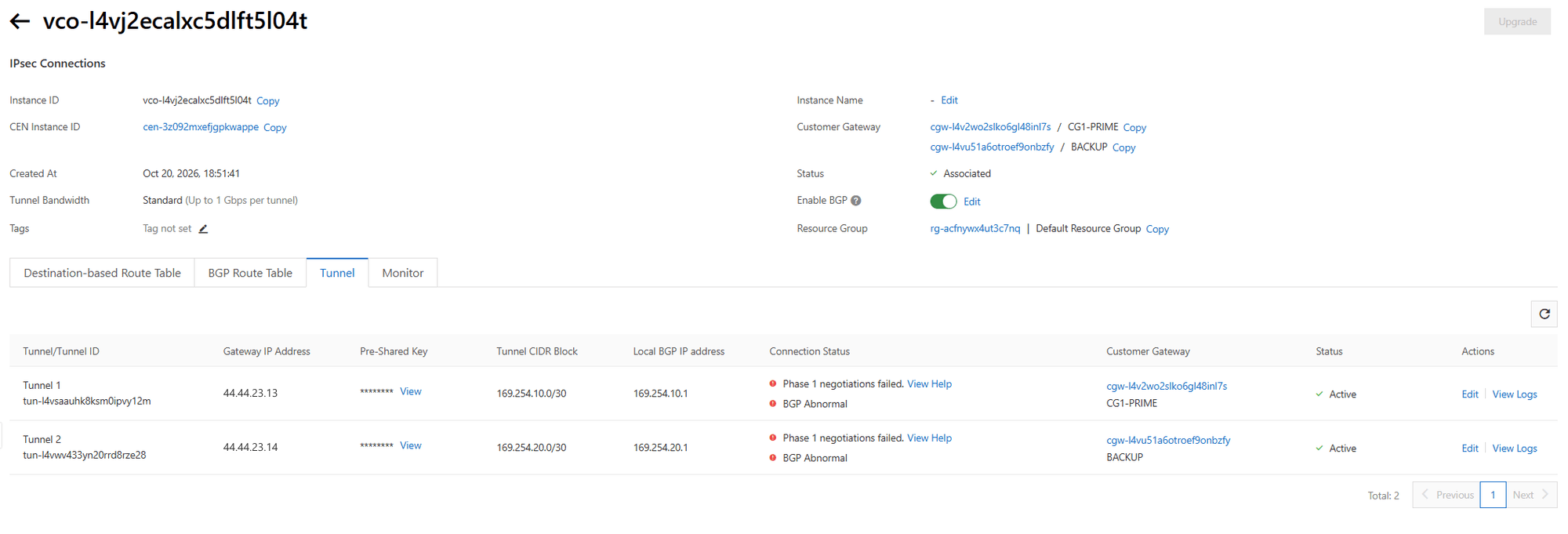
At first, both tunnels failed phase 1:
Both Alibaba tunnels: Phase 1 negotiations failed and BGP Abnormal
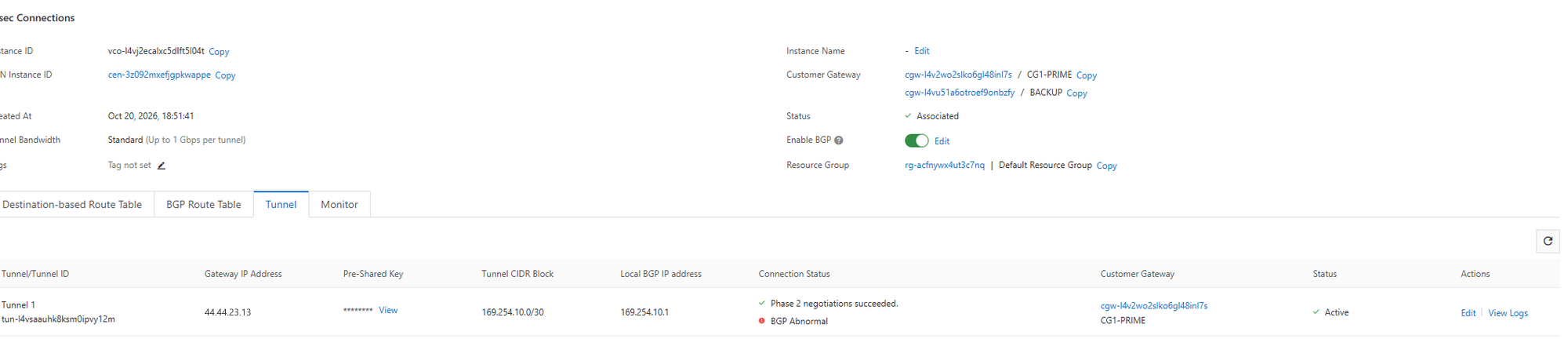
After fixing the PSKs and IKE settings, tunnel 1 passed phase 2, but BGP stayed abnormal:
Tunnel 1: Phase 2 negotiations succeeded, but BGP Abnormal
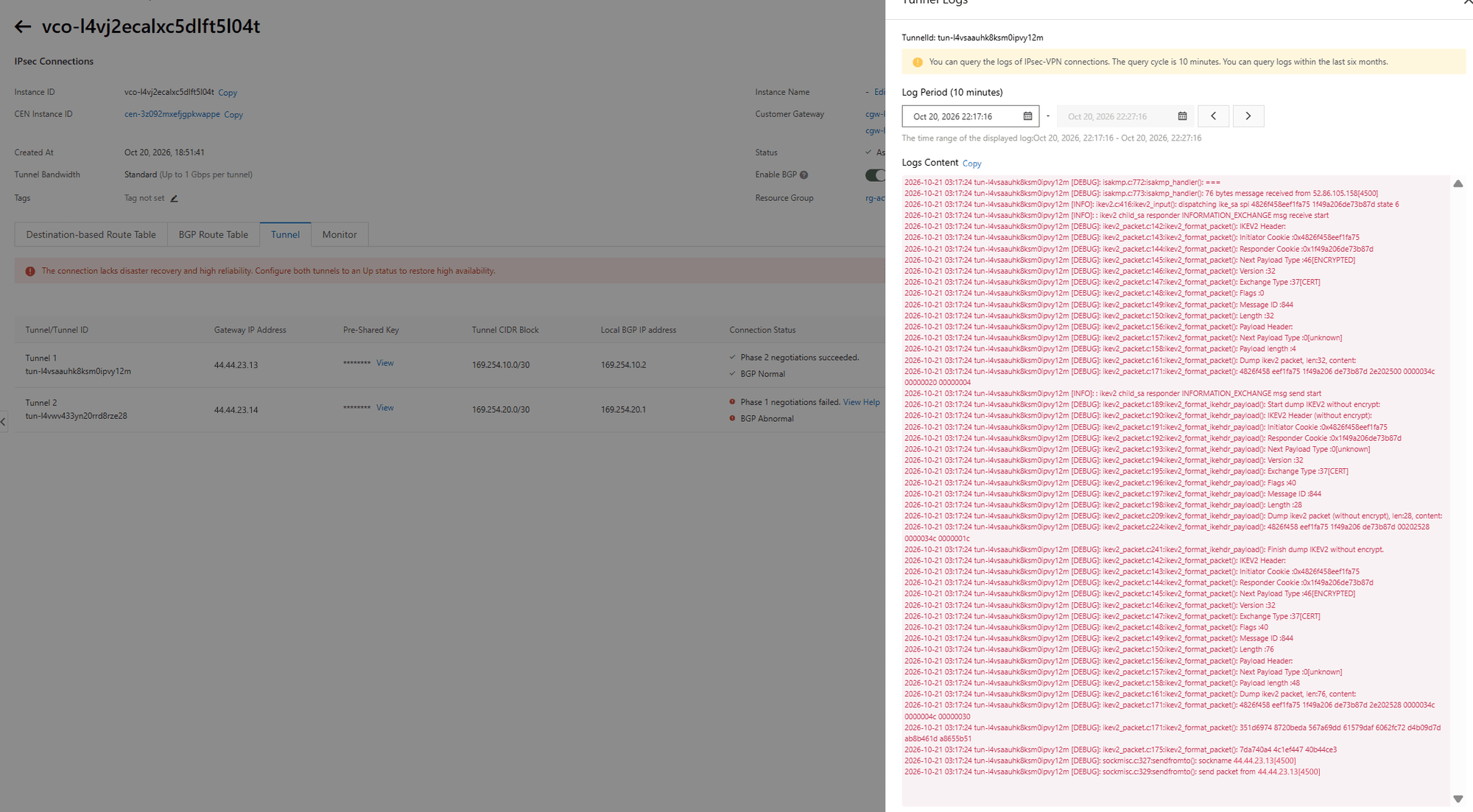
The fix came from the logs. On Alibaba, each tunnel has View Logs with the IKE exchange:
Alibaba tunnel logs: IKEv2 exchange with AWS on UDP 4500
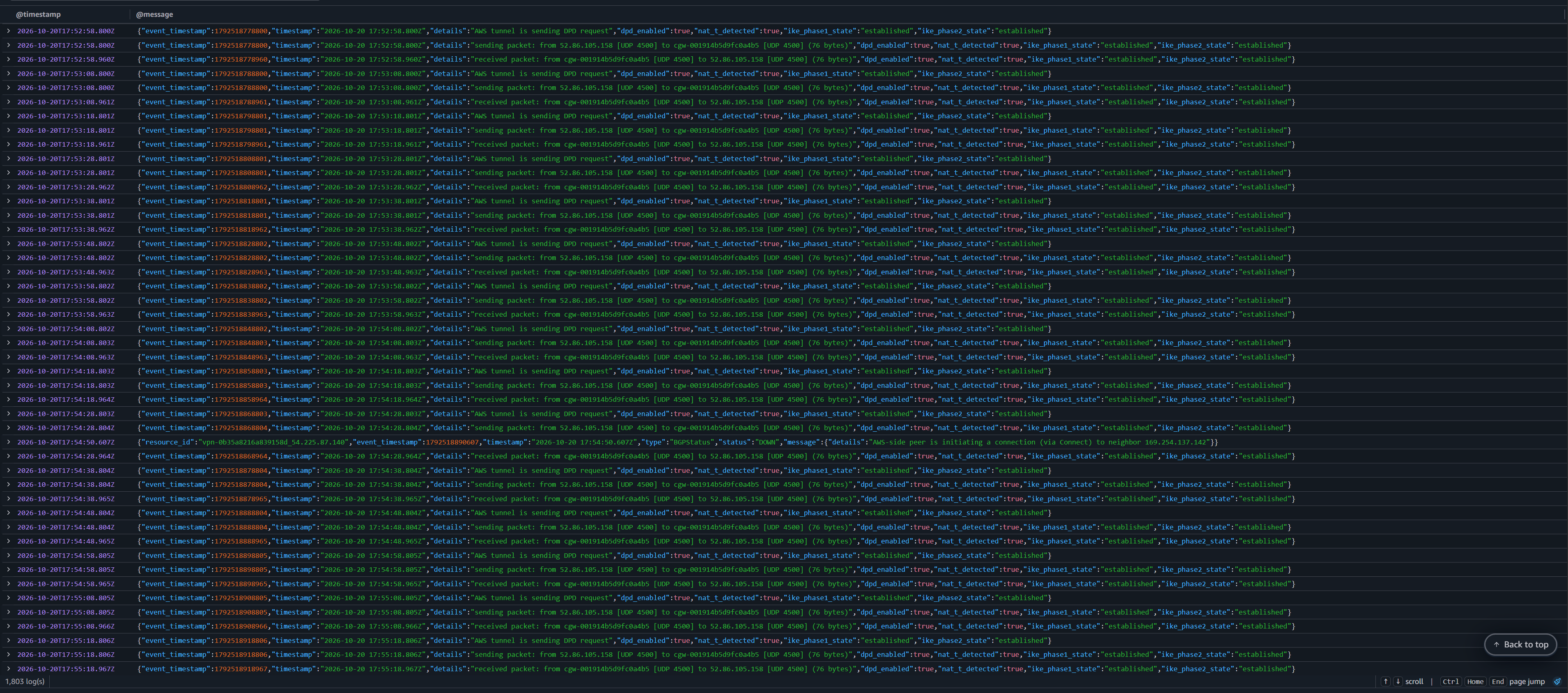
On AWS, the CloudWatch tunnel logs show the IKE state, DPD and NAT-T, and the BGP log even names the neighbor IP it expects:
AWS CloudWatch tunnel logs: IKE phase 1 and 2 established, DPD and NAT-T detected
Problem
Evidence
Fix
Alibaba BGP IP conflicts with AWS
Alibaba used 169.254.10.1 and 169.254.20.1, but AWS owns .1
Change to 169.254.10.2 and 169.254.20.2
Tunnel 2 uses a different Alibaba IP
Tunnel 1 is 44.44.23.13, tunnel 2 is 44.44.23.14, but the AWS CGW only knows .62
Create a second AWS CGW (44.44.23.14, ASN 45104) and a second AWS VPN connection
Tunnel 2 inside CIDRs don't match
AWS tunnel 2 used 169.254.137.140/30, Alibaba used 169.254.20.0/30
Use the same /30 on both sides
Phase 1 failed on both tunnels
Connection status
Recheck the PSK and IKE parameters
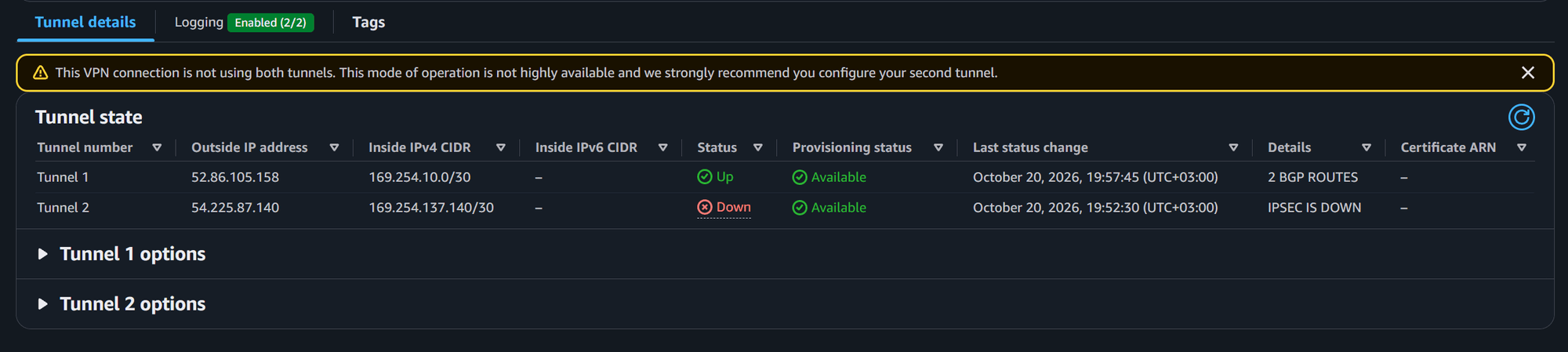
After the fix, AWS tunnel 1 is Up with 2 BGP routes:
AWS tunnel state: tunnel 1 Up with 2 BGP routes, tunnel 2 Down
And Alibaba shows Phase 2 succeeded and BGP Normal on tunnel 1 (visible behind the log panel in the logs screenshot above).
Key lesson: an AWS VPN connection has one customer gateway IP, and both AWS tunnels end on that IP. Alibaba's dual-tunnel IPsec uses two different public IPs. So for full redundancy you need two AWS VPN connections: one to 44.44.23.13 and one to 44.44.23.14. In this lab only tunnel 1 is up, which is fine for a proof of concept but not highly available. Both consoles warn about this.
Troubleshooting: tunnel and BGP
"Phase 1 negotiations failed": PSK, IKE version, encryption, integrity, DH group or peer IP mismatch.
Tunnel drops at rekey: a phase 2 PFS DH group mismatch. In the AWS logs, the first child SA came up with PFS none and the rekey with DH group 2. Set the same PFS group on both sides.
"BGP Abnormal" or AWS BGP stuck in Connect / Active: wrong BGP IPs (.1 vs .2), the same ASN on both sides (eBGP needs different ASNs), or wrong ASN on a customer gateway.
BGP up but no traffic: check that routes are exchanged, not just that BGP is up. AWS should show "N BGP ROUTES", and the Alibaba BGP route table should list 172.31.0.0/16.
Read the logs first. AWS: CloudWatch tunnel logs (monitoring with CloudWatch). Alibaba: View Logs on each tunnel.
Step 10: Routes, security and the first test
With the tunnel up, routing and firewalls decide whether packets actually arrive. Check both sides.
Transit Router attachments
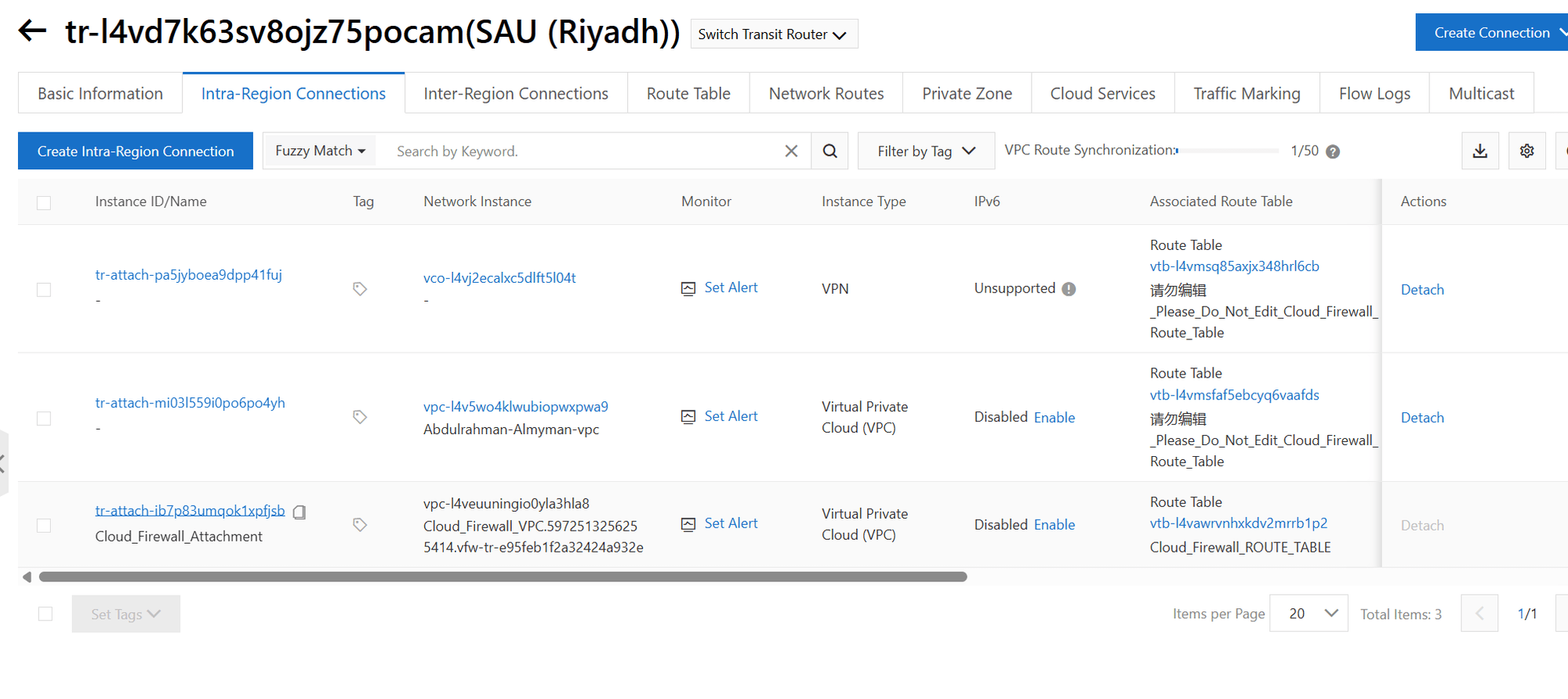
The TR now has the VPN attachment and the VPC attachment (and later the Cloud Firewall attachment):
Transit Router intra-region connections: VPN, VPC and Cloud Firewall attachments
Route tables on both sides
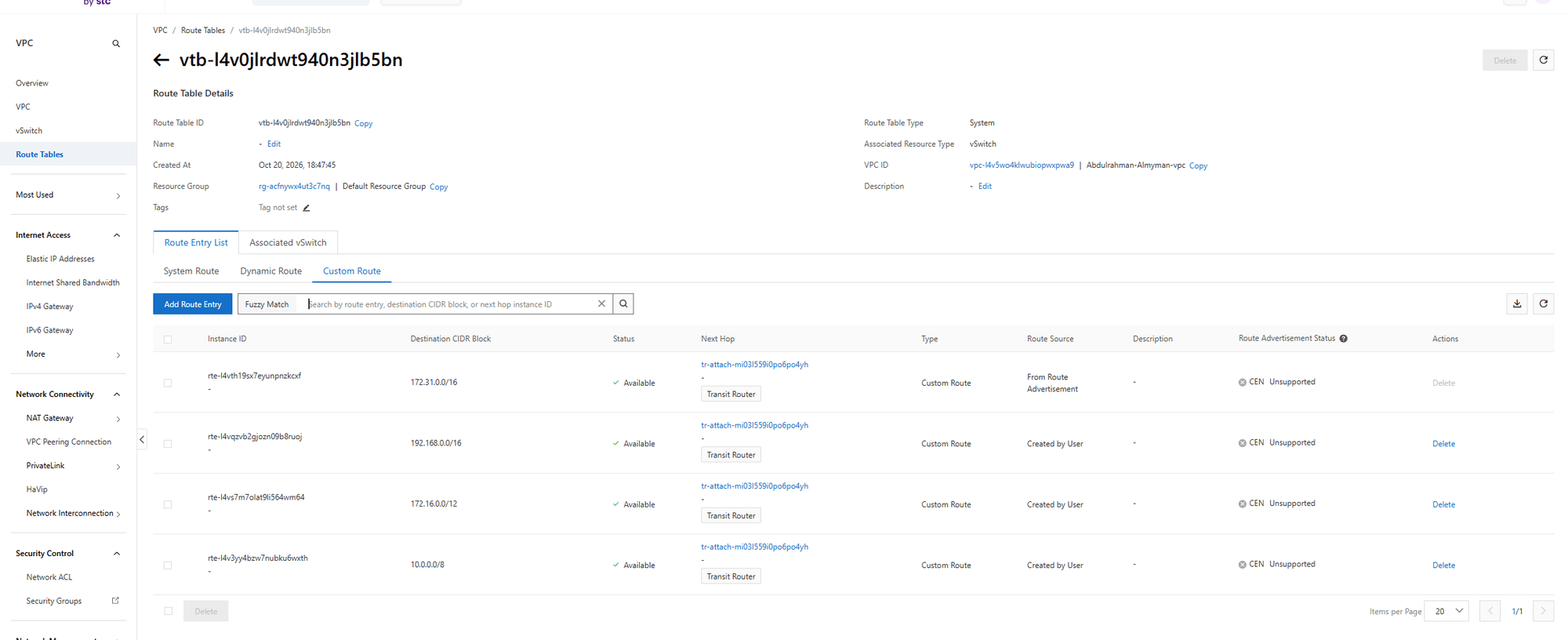
Alibaba VPC route table (custom routes pointing to the TR):
Transit Router route table with propagated routes from the VPN and the VPC
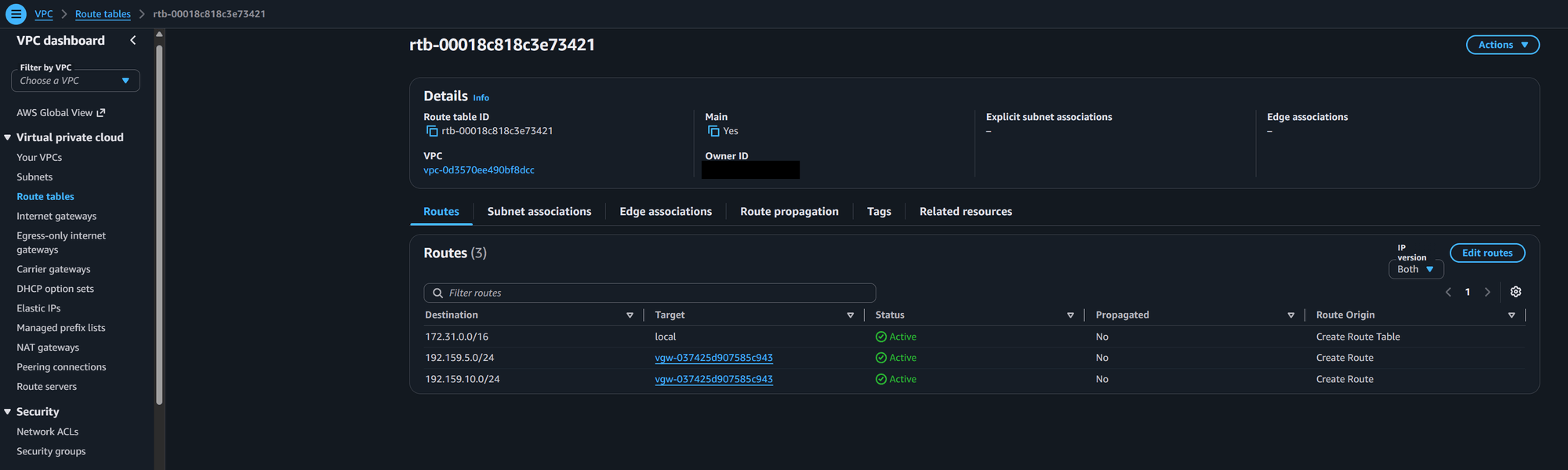
AWS VPC route table:
Destination
Target
172.31.0.0/16
local
192.159.5.0/24
virtual private gateway
192.159.10.0/24
virtual private gateway
AWS route table with the Alibaba vSwitch CIDRs pointing to the virtual private gateway
I added the Alibaba routes by hand. You can instead turn on route propagation for the VGW, and AWS adds the routes learned over BGP for you.
Network ACL and security groups
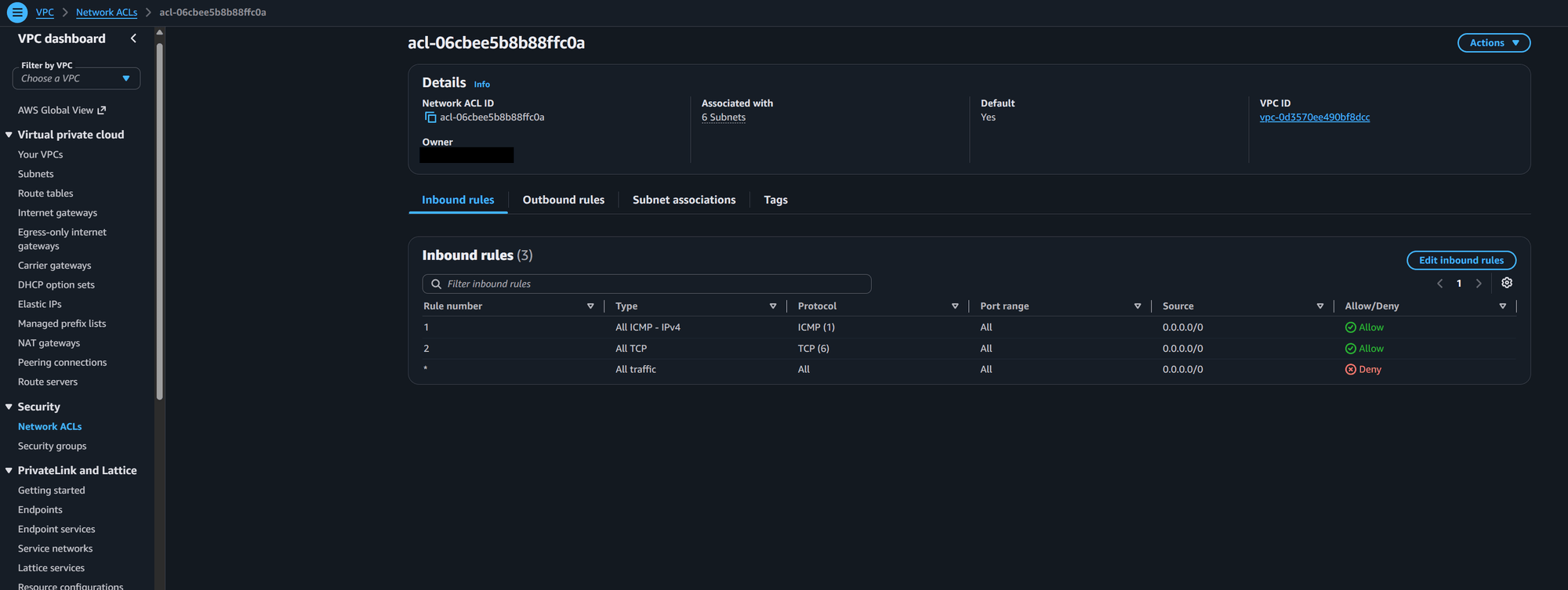
AWS network ACL (inbound):
Rule
Type
Protocol
Port
Source
Action
1
All ICMP (IPv4)
ICMP
All
0.0.0.0/0
Allow
2
All TCP
TCP
All
0.0.0.0/0
Allow
*
All traffic
All
All
0.0.0.0/0
Deny
AWS network ACL inbound rules allowing ICMP and TCP
Network ACLs are stateless: allow the traffic inbound and outbound, including return traffic. See network ACLs and custom network ACLs.
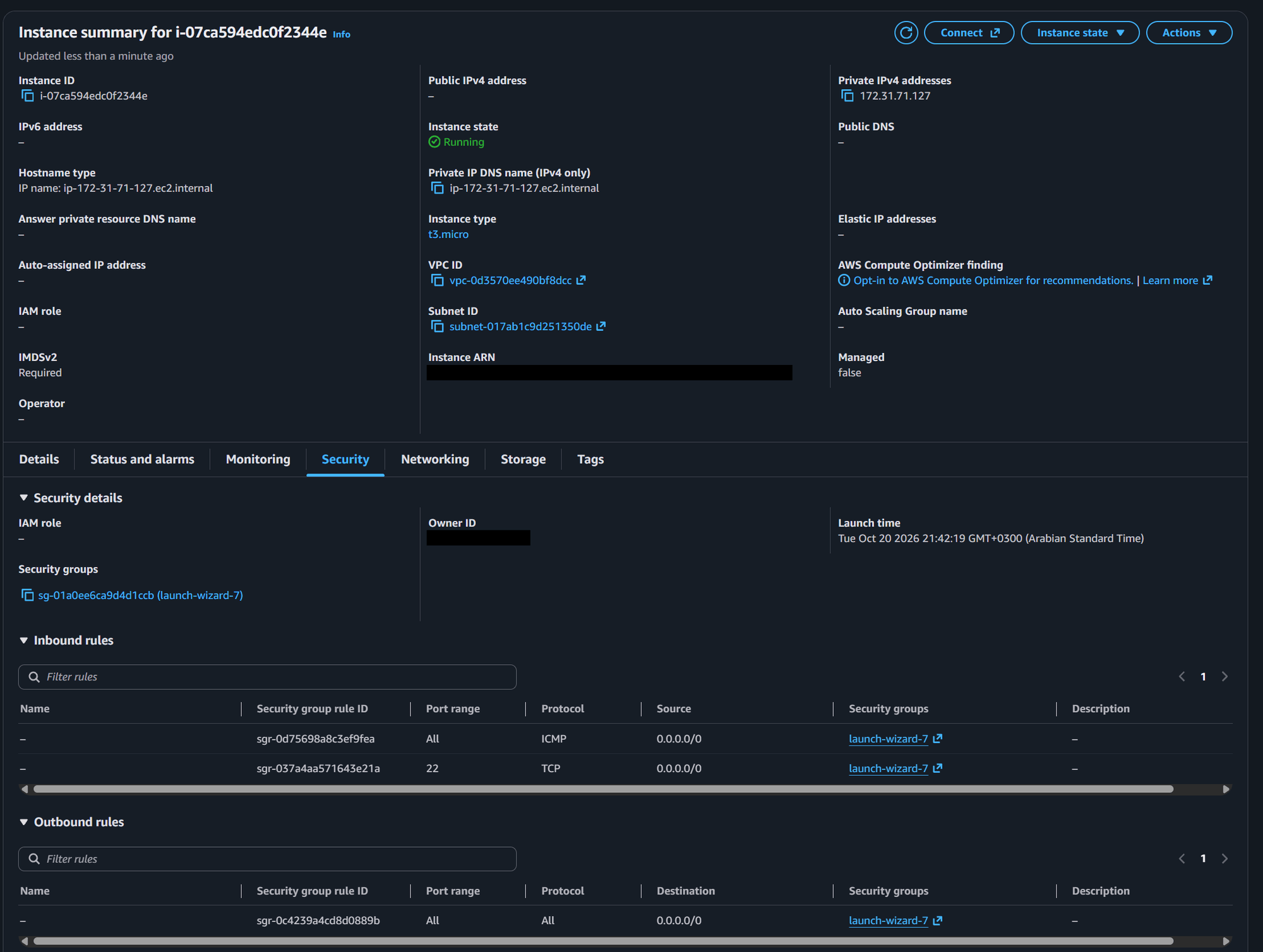
AWS security group of the EC2:
Direction
Protocol
Port
Source / destination
Inbound
ICMP
All
0.0.0.0/0
Inbound
TCP
22 (SSH)
0.0.0.0/0
Outbound
All
All
0.0.0.0/0
EC2 with private IP 172.31.71.127 and its security group rules for ICMP and SSH
Alibaba security group of the ECS: allow ICMP and TCP 22 inbound from 172.31.0.0/16.
For a lab, 0.0.0.0/0 is simple. In real setups, restrict the source to the other cloud's CIDR (192.159.0.0/16 on AWS and 172.31.0.0/16 on Alibaba). See security groups.
Test: ping, SSH and tracepath
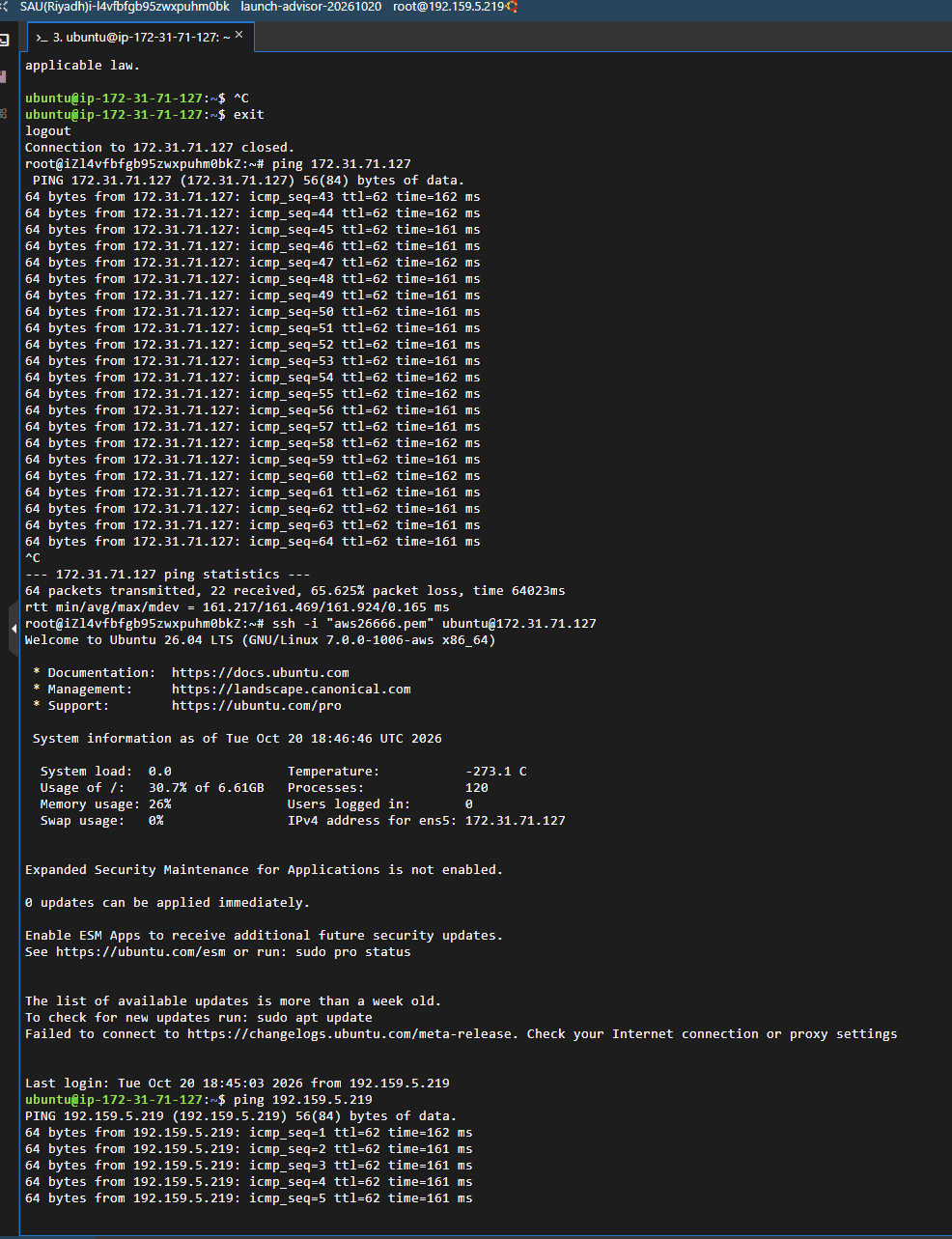
From the Alibaba ECS to the AWS EC2:
Alibaba ECS (192.159.5.219)
ping172.31.71.127
tracepath -n172.31.71.127
# SSH with a key file (recommended over passwords)chmod400 aws-key.pem
ssh-i aws-key.pem [email protected]
Then from the AWS EC2 back to the ECS:
AWS EC2 (172.31.71.127)
ping192.159.5.219
tracepath -n192.159.5.219
Ping from the Alibaba ECS to the EC2 private IP, SSH into the EC2, and ping back to the ECS
It works over private IPs only: the EC2 has no public IP at all. Latency is about 161 ms, which makes sense for Riyadh to N. Virginia. In the first ping run some packets were lost (22 of 64 received). The later runs had 0% loss.
Troubleshooting: ping, SSH and private access
Work layer by layer: IKE phase 1, then phase 2, then BGP, then routes, then NACL and security groups, then the OS firewall.
No reply to ping: check the route tables on both sides first, then the NACL (both directions), then the security groups (ICMP allowed from the remote CIDR).
Ping works, SSH doesn't: TCP 22 is missing in a security group or NACL, the key has the wrong permissions (chmod 400), or the wrong user (Ubuntu on EC2 uses ubuntu).
Not sure where packets stop: run sudo tcpdump -ni any icmp on the target. If requests arrive but no replies leave, the problem is on that host or its return route. If nothing arrives, look at the tunnel and the routes.
A NACL rule with port range 0 matches nothing. Use All or the real port.
Overlapping CIDRs break routing silently. Both clouds must use different ranges.
Use tracepath -n to see where the path ends.
Step 11 (Alibaba): Add a Cloud Firewall VPC firewall
To inspect the traffic between AWS and the VPC, I enabled a VPC firewall on the Transit Router (east-west protection).
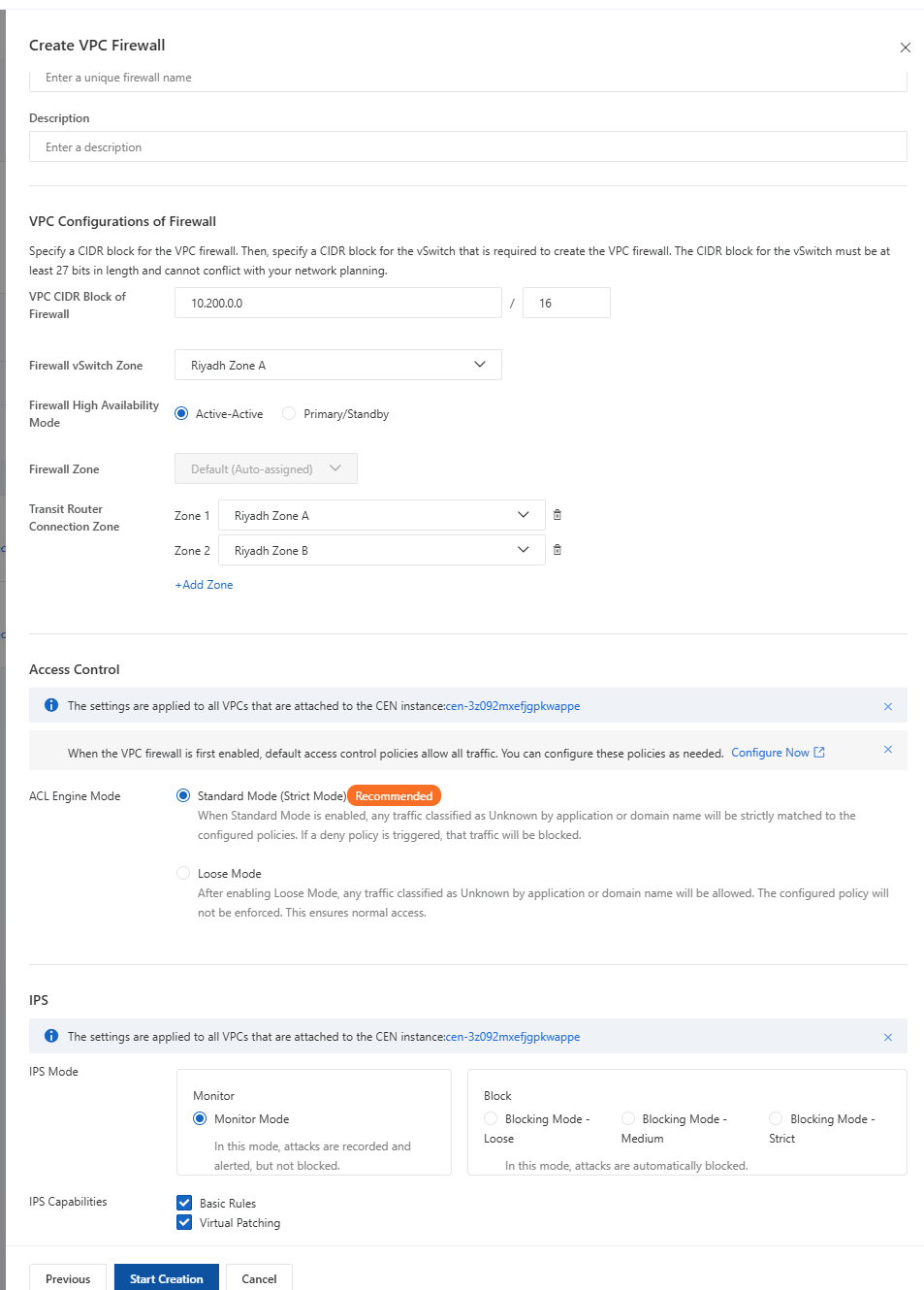
Create the firewall with its own CIDR (10.200.0.0/16), a vSwitch zone, Active-Active high availability, and the TR connection zones (Zone A and Zone B). I used Standard (strict) ACL mode and IPS in monitor mode with basic rules and virtual patching:
Creating the VPC firewall with CIDR 10.200.0.0/16, Active-Active HA, strict ACL mode and IPS in monitor mode
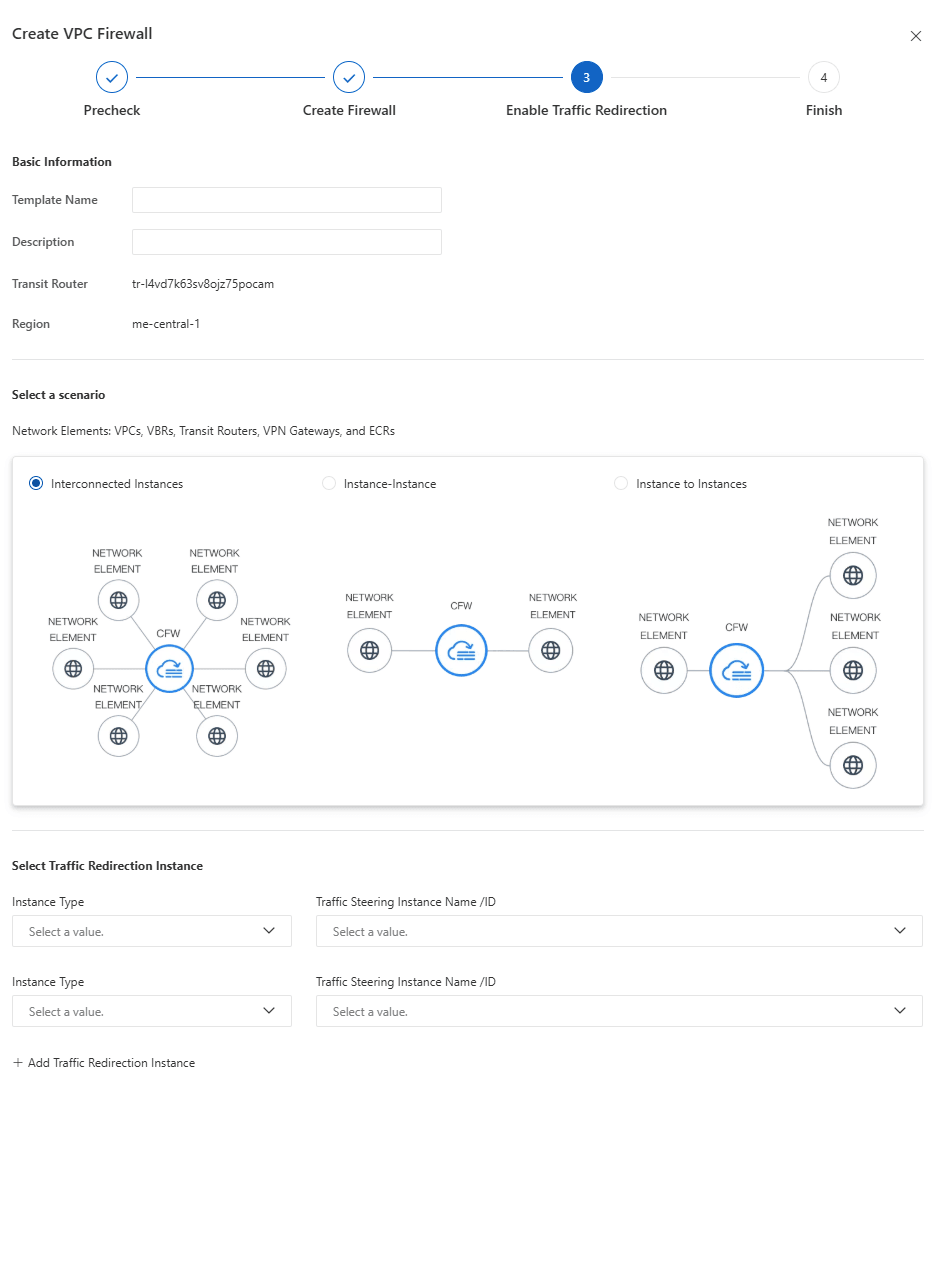
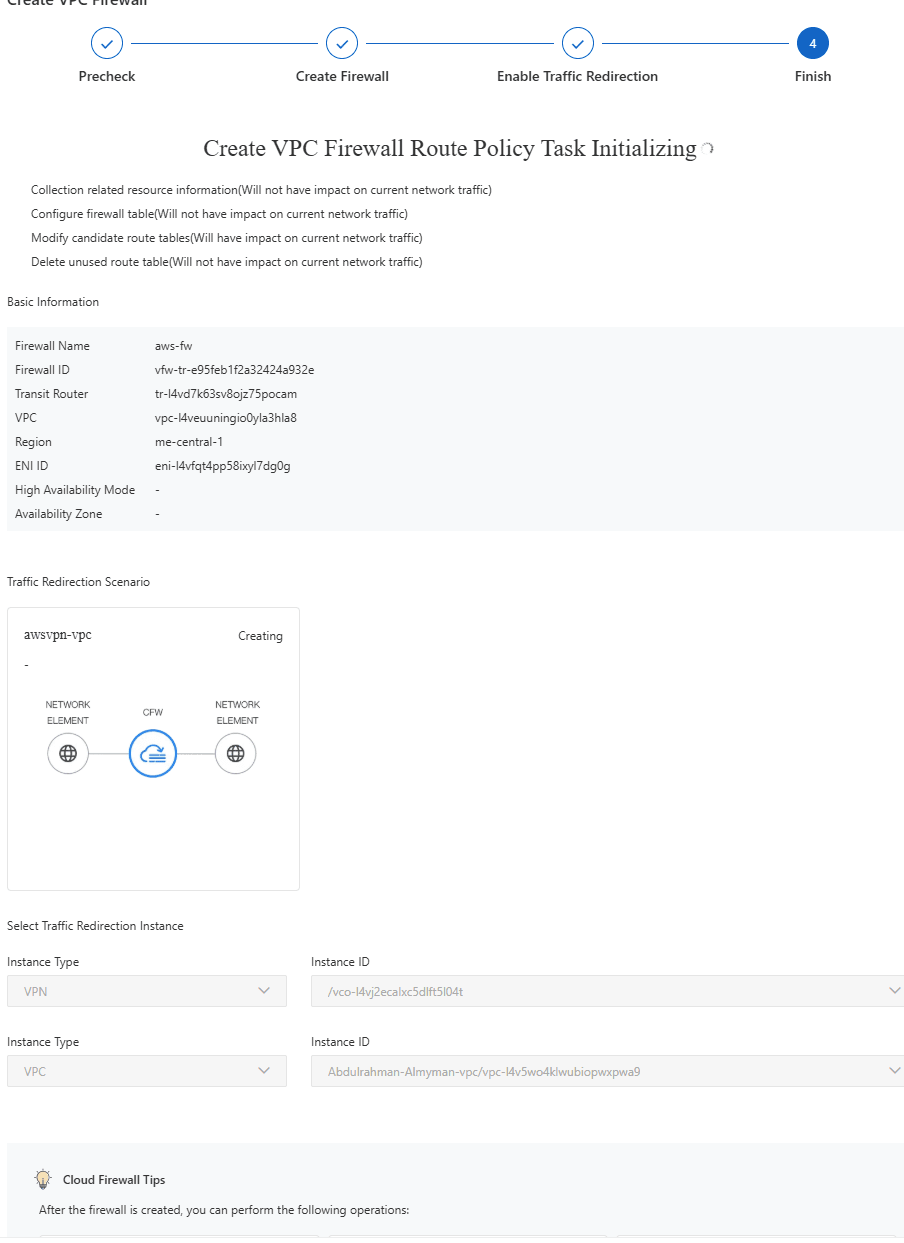
Then enable traffic redirection between the two network elements, the VPN attachment and the VPC:
Choosing the traffic redirection scenario for the firewall
Review: firewall aws-fw redirecting traffic between the VPN and the VPC
The result: the firewall is enabled and protects 2 network elements:
Cloud Firewall creates its own TR route tables named "Please_Do_Not_Edit_Cloud_Firewall_Route_Table". As the name says, don't edit them. When the firewall is first enabled, its default policies allow all traffic. Add your own access control policies after that.
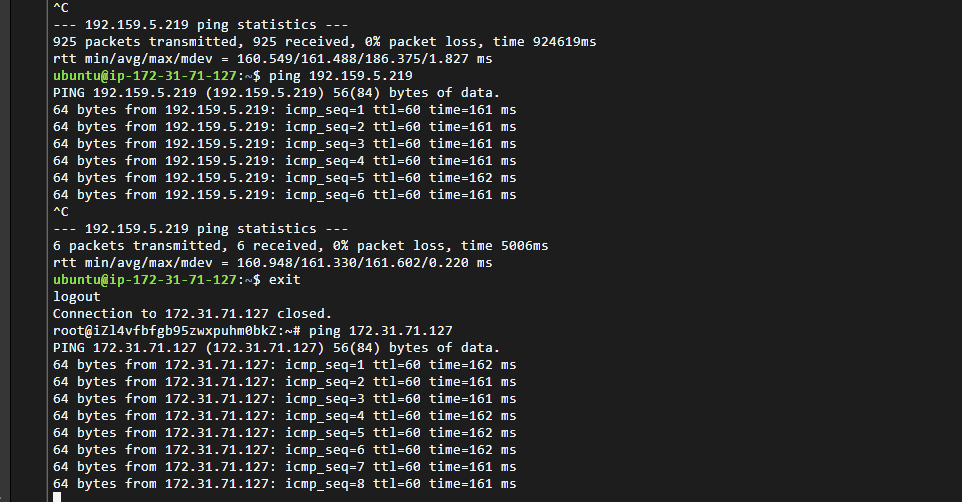
After the firewall: ping in both directions, 0% packet loss, TTL now 60
Still working, with 0% packet loss (925 of 925 packets in one run). Notice the TTL dropped from 62 to 60: the traffic now passes through the firewall, which adds hops. That is a quick way to confirm the firewall is really in the path.
What I would do next
Full redundancy: a second AWS VPN connection to Alibaba's second IP (44.44.23.14), so both tunnels are up.
Private CIDRs instead of 192.159.0.0/16.
Tighter rules: NACLs, security groups and firewall policies limited to the other cloud's CIDR and the ports you need.
Monitoring: CloudWatch alarms on tunnel state (VPN metrics) and alerts on the TR attachments.
Acknowledgment
Thanks to Hussah Alotaibi, co-op, for her help on this project. She built and documented the same AWS and Alibaba Cloud connection, and her notes on BGP and tunnel settings helped me find my mistakes faster. Her documentation is available to download:
Connecting two clouds with IPsec is not hard, but it is unforgiving: one wrong character in a pre-shared key, one .1 instead of .2, or one missing route, and nothing works. The pattern that saved me was simple. Plan the IPs first. Remember that every customer gateway describes the other side. Copy settings from the AWS configuration file instead of retyping them. Then troubleshoot layer by layer, from IKE to BGP to routes to firewalls, and read the logs on both sides. With a Transit Router in the middle, the same VPN can later serve more VPCs and regions, protected by Cloud Firewall.