AWS to Alibaba Cloud IPsec VPN, Direct to the VPC (No Transit Router)
Hi! [ ^_^ ]/ In my previous lab I connected AWS and Alibaba Cloud through a CEN Transit Router, with a Cloud Firewall in the middle. That design is great when you have many VPCs, but it has more moving parts and more cost.
This time I built the same connection the direct way: the IPsec tunnels end on an Alibaba VPN gateway attached straight to the VPC. Same goal (an EC2 in AWS and an ECS in Alibaba Cloud talking over private IPs, encrypted, with BGP), fewer components.
Note: the Alibaba Cloud public IPs in this article and its screenshots are replaced with example IPs (44.44.23.13 and 44.44.23.14), and all pre-shared keys are hidden. Use your own values.
If you only need one Alibaba VPC to talk to AWS, the direct way is the simpler choice.
Architecture
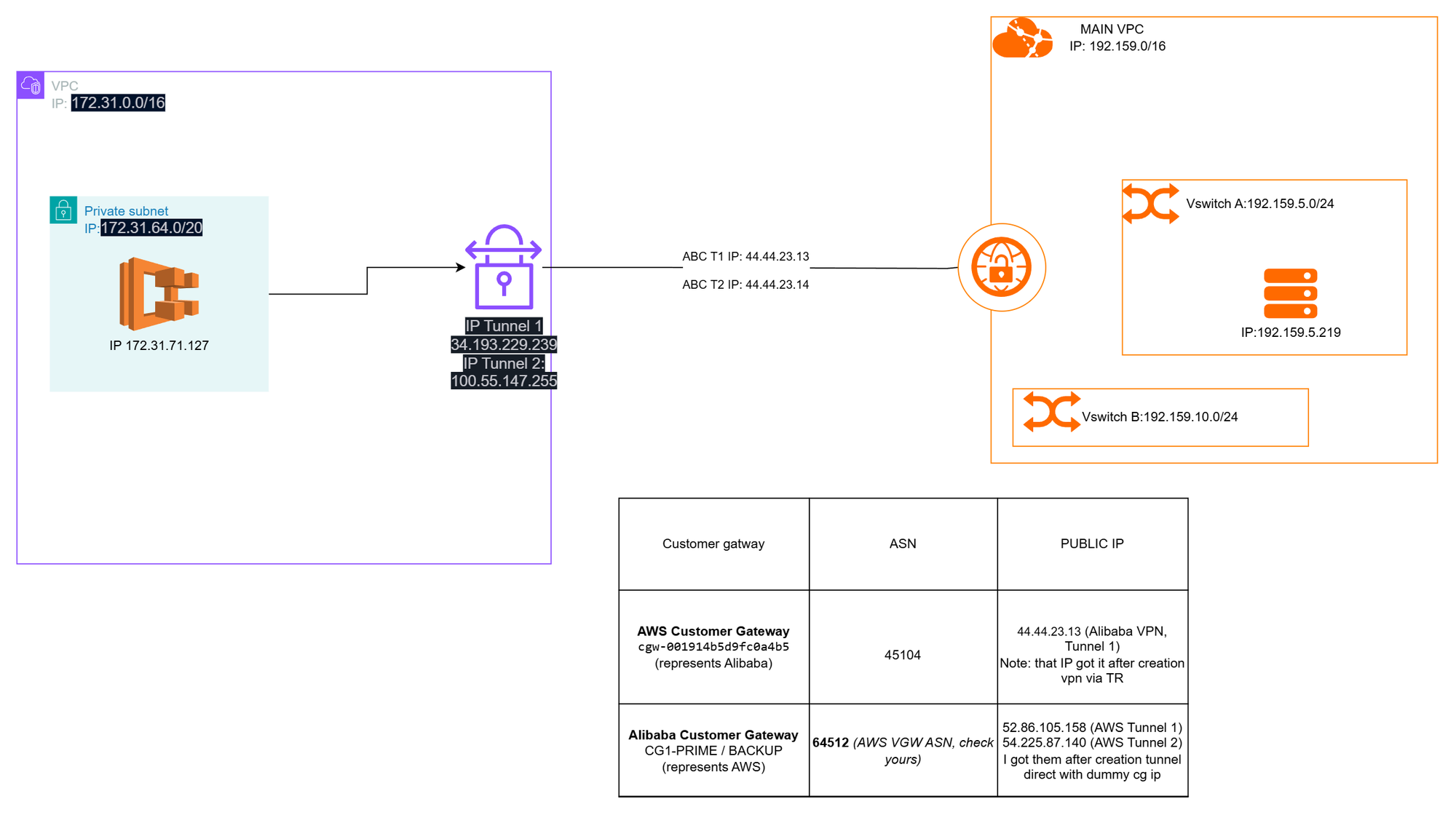
Architecture: the AWS VPC with an EC2 in a private subnet connects through the virtual private gateway's two tunnels to the Alibaba VPN gateway, which sits directly in the main VPC with vSwitch A and vSwitch B
Customer gateways and an IPsec connection bound to the VPN gateway
IPsec tunnel logs for troubleshooting
ECS to test ping and SSH
AWS (US East, N. Virginia)
VPC with a private subnet
Virtual private gateway (VGW)
Customer gateway and Site-to-Site VPN connection
CloudWatch Logs for tunnel and BGP logs
EC2 with no public IP, to test the connection
The IP plan
Item
Value
AWS VPC
172.31.0.0/16
AWS private subnet
172.31.64.0/20
AWS EC2
172.31.71.127
Alibaba VPC
192.159.0.0/16
vSwitch A / vSwitch B
192.159.5.0/24 / 192.159.10.0/24
Alibaba ECS
192.159.5.219
Alibaba VPN gateway (tunnel 1 / tunnel 2)
44.44.23.13 / 44.44.23.14 (examples)
AWS tunnel outside IPs (tunnel 1 / tunnel 2)
34.193.229.239 / 100.55.147.255
BGP inside CIDR, tunnel 1
169.254.151.240/30: AWS .241, Alibaba .242
ASN
AWS 64512 (Amazon default), Alibaba 45104
As in my first lab, 192.159.0.0/16 is a public range used only for this lab. In production, use non-overlapping RFC 1918 private ranges.
Remember the golden rule: a customer gateway always describes the other side. The AWS customer gateway holds Alibaba's IP and ASN, and the Alibaba customer gateways hold AWS's tunnel IPs and ASN.
Why this order of steps?
Each side needs the other side's public IP. In the direct design the order is clean, with no placeholder needed:
Create the Alibaba VPN gateway first. It gives you Alibaba's public IPs immediately.
In AWS, create the customer gateway with Alibaba's IP, then the VPN connection. It gives you AWS's tunnel IPs and pre-shared keys.
Back in Alibaba, create the customer gateways with AWS's tunnel IPs, then the IPsec connection.
Step 1 (Alibaba): Create the VPN gateway
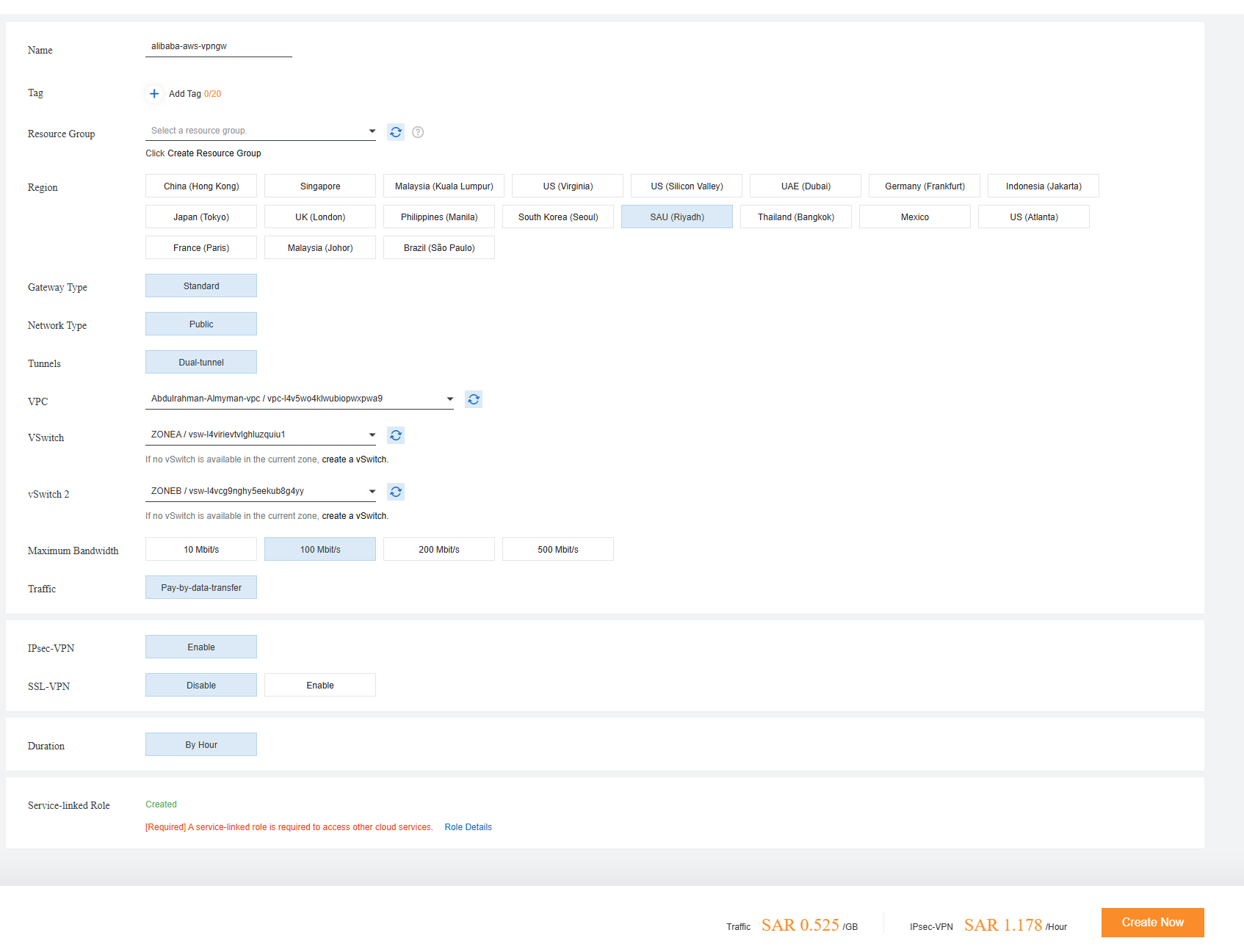
In the VPN console, create a VPN gateway in the VPC's region:
VPC: your VPC, with a vSwitch in Zone A and a second one in Zone B
Bandwidth: 100 Mbit/s was enough for the lab
IPsec-VPN: Enable (SSL-VPN not needed)
Creating the Alibaba VPN gateway alibaba-aws-vpngw in SAU Riyadh: Standard, Public, Dual-tunnel, attached to the VPC with vSwitches in Zone A and Zone B, IPsec-VPN enabled
When it is active, note its two IPsec addresses. These are Alibaba's public IPs for tunnel 1 and tunnel 2.
The VPN gateway is active with IPsec address 1 (44.44.23.13) and IPsec address 2 (44.44.23.14)
Step 2 (AWS): Create the virtual private gateway
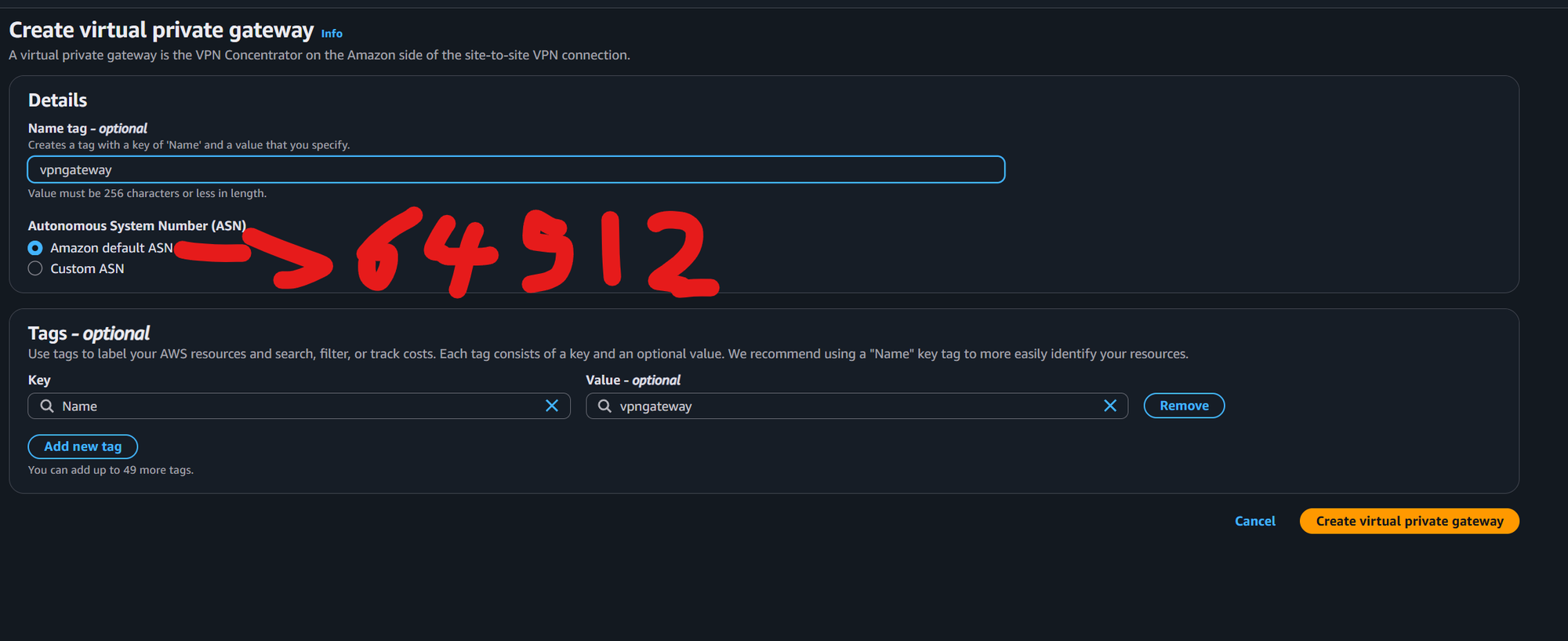
Create a virtual private gateway with the Amazon default ASN (64512) and attach it to your VPC.
Creating the AWS virtual private gateway with the Amazon default ASN 64512
Step 3 (AWS): Create the customer gateway
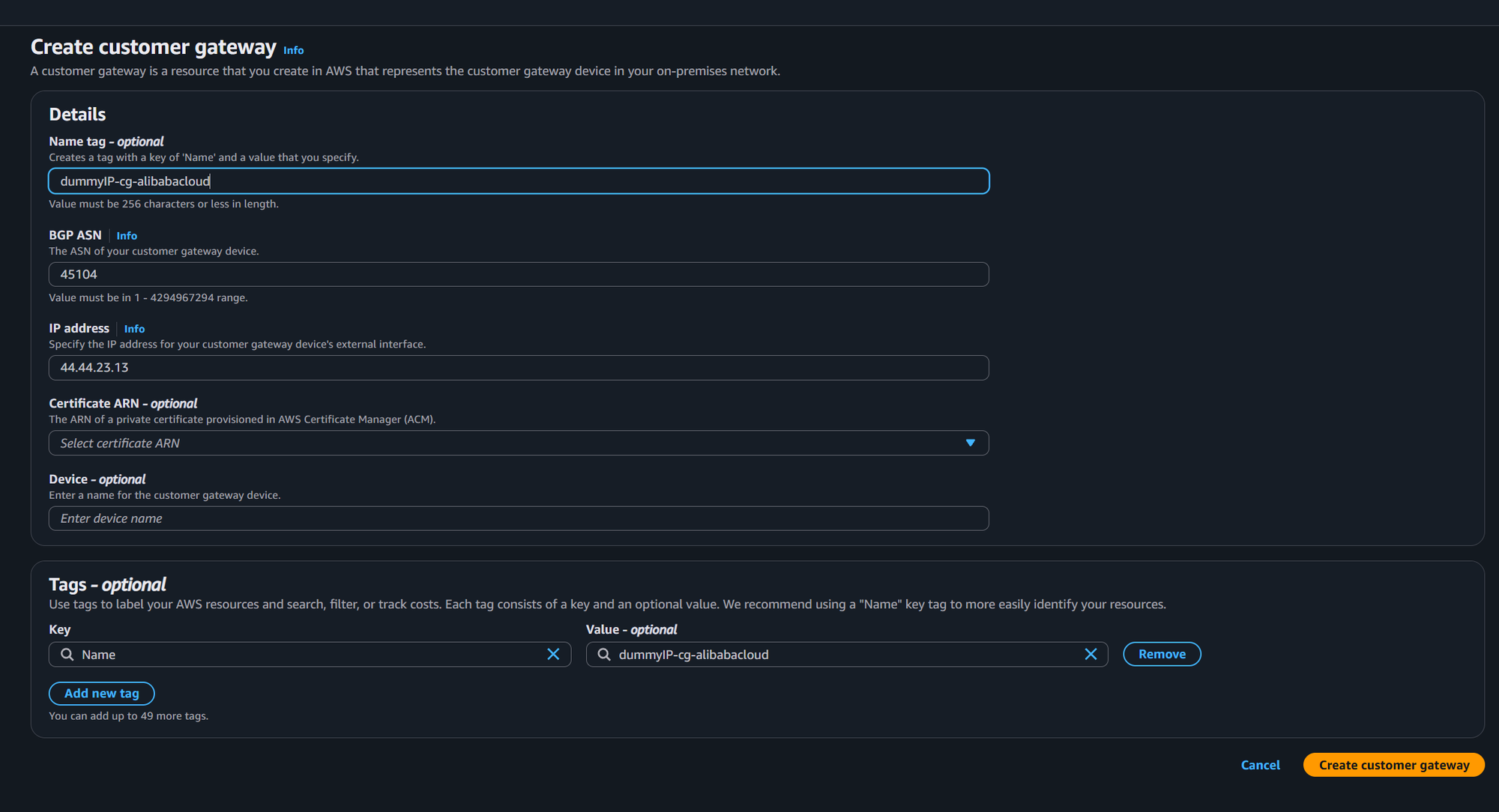
Create a customer gateway that represents Alibaba: BGP ASN 45104 and Alibaba's tunnel 1 IP (44.44.23.13).
Creating the AWS customer gateway with BGP ASN 45104 and Alibaba's VPN IP 44.44.23.13
Step 4 (AWS): Create the Site-to-Site VPN connection
Create the VPN connection with the virtual private gateway, the customer gateway from step 3, dynamic (BGP) routing, and tunnel logging to CloudWatch. Then click Download configuration and pick Generic: it has the pre-shared key and IKE settings for each tunnel, so you never retype them.
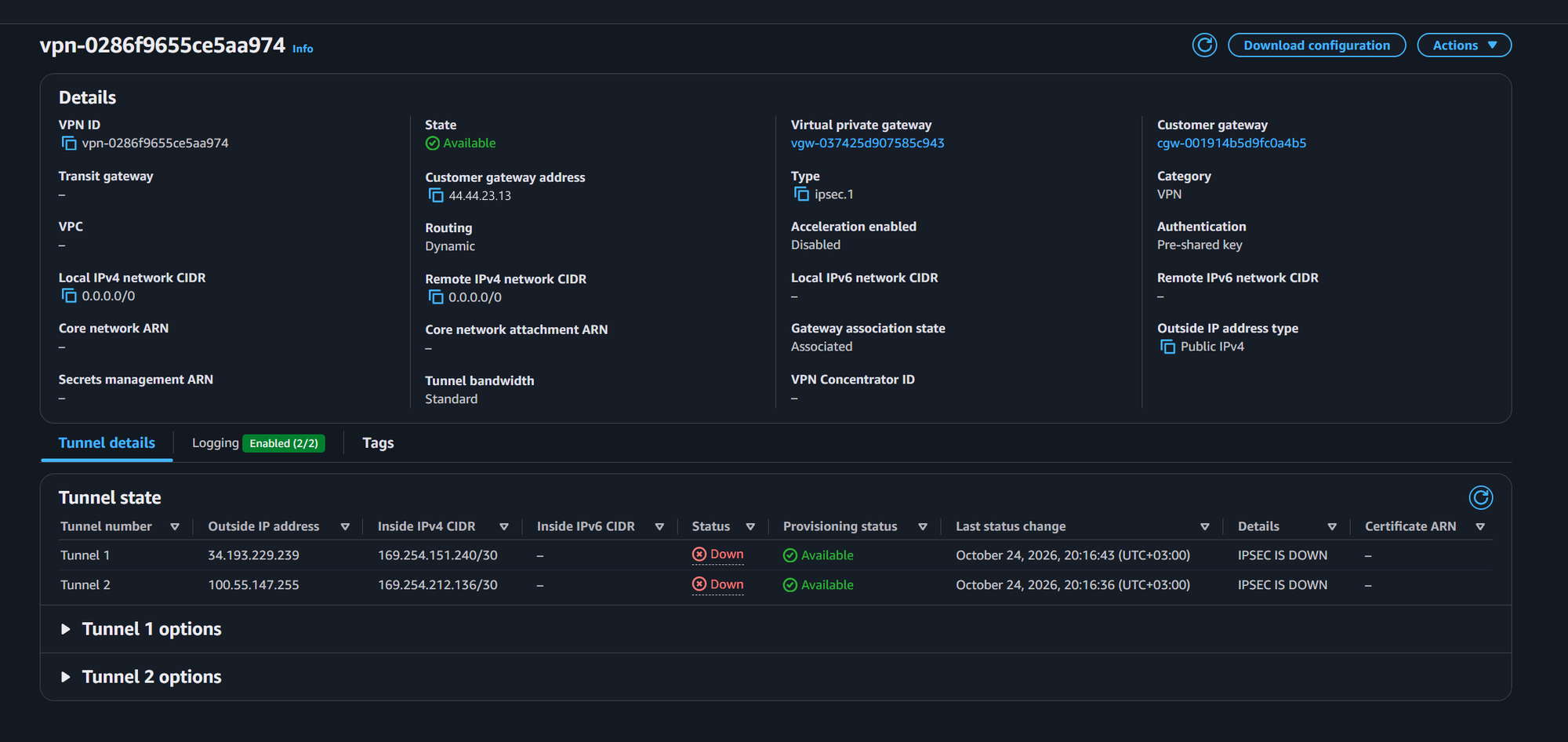
The AWS VPN connection: customer gateway 44.44.23.13, dynamic routing, tunnel 1 at 34.193.229.239 and tunnel 2 at 100.55.147.255, both down until Alibaba is configured
Both tunnels are down for now. That is expected: Alibaba is not configured yet.
Step 5 (Alibaba): Create the customer gateways
Create one customer gateway per AWS tunnel, both with AWS's ASN 64512:
Main: 34.193.229.239 (AWS tunnel 1)
backup: 100.55.147.255 (AWS tunnel 2)
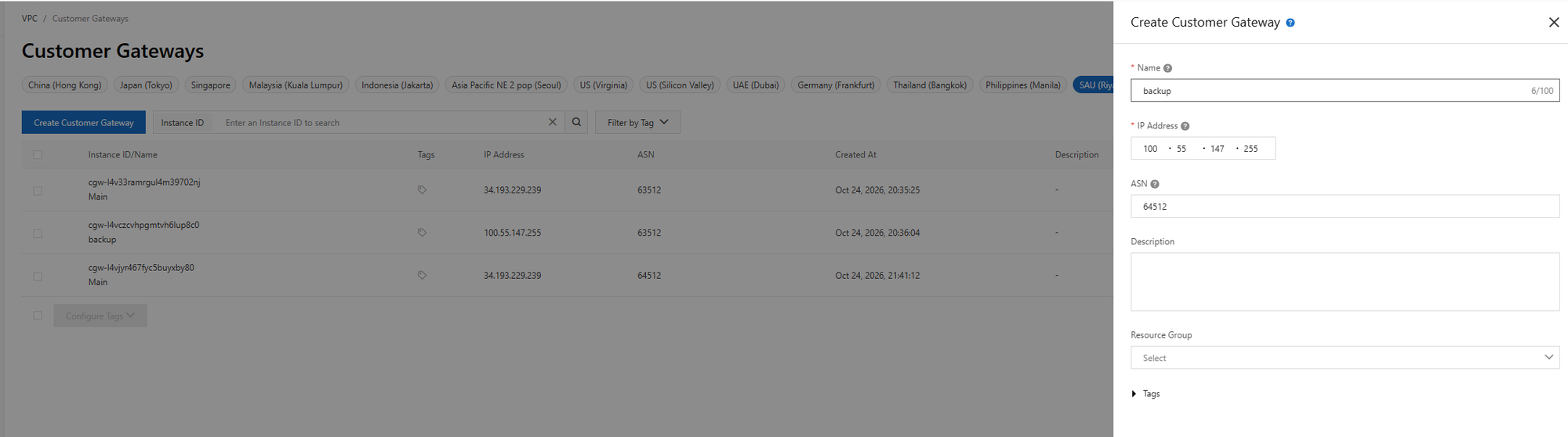
Creating the Alibaba customer gateway backup with AWS tunnel 2's IP 100.55.147.255 and ASN 64512
Look closely at the list behind the form: my first two customer gateways had ASN 63512, a typo for 64512. That one digit broke BGP, as you will see in the troubleshooting section.
Step 6 (Alibaba): Create the IPsec connection
Create an IPsec-VPN connection and bind it to the VPN gateway from step 1:
Routing mode: Destination routing
Effective immediately: Yes
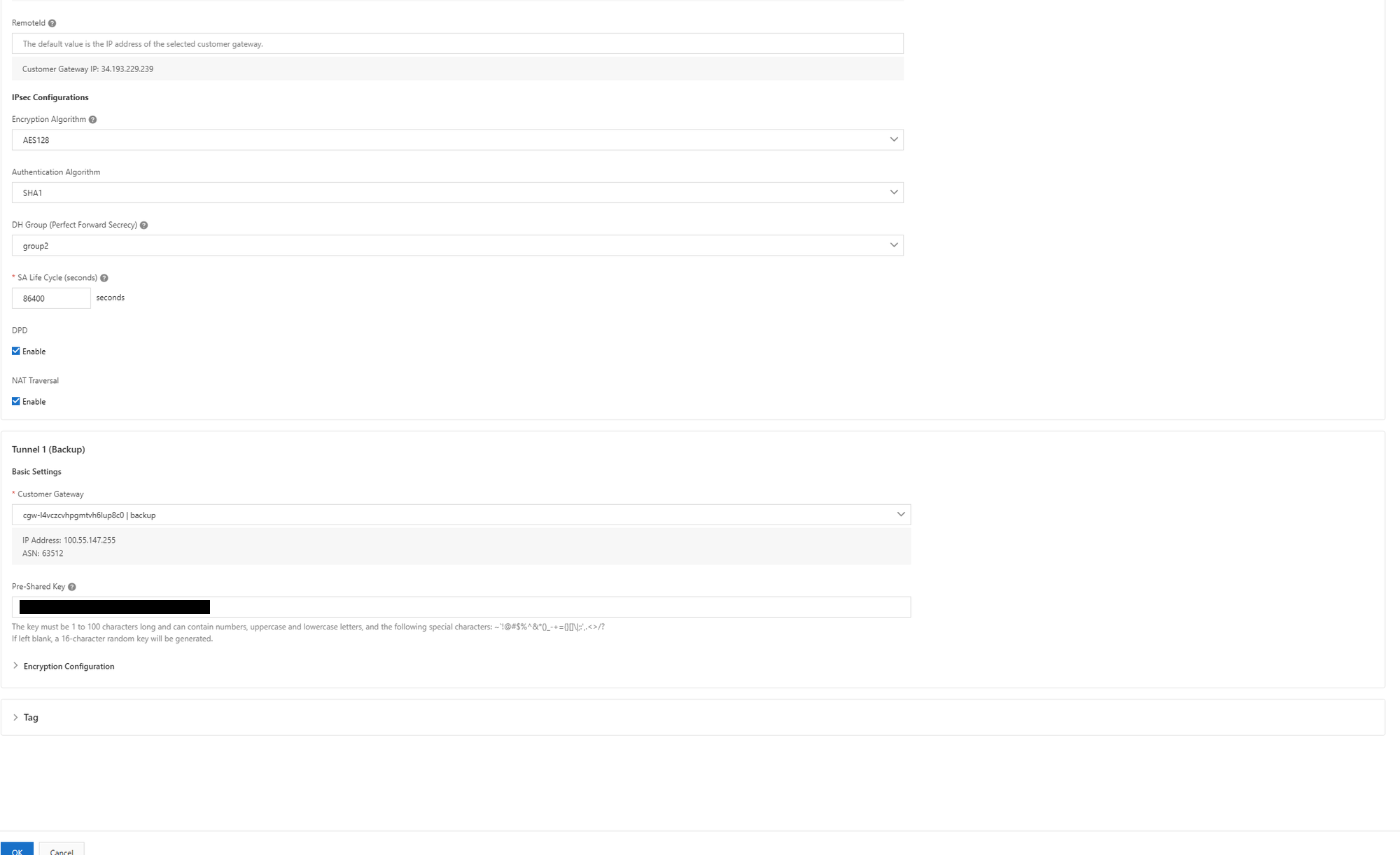
Tunnel 1 (Primary): customer gateway Main, with the pre-shared key of AWS tunnel 1
Tunnel 2 (Backup): customer gateway backup, with the pre-shared key of AWS tunnel 2
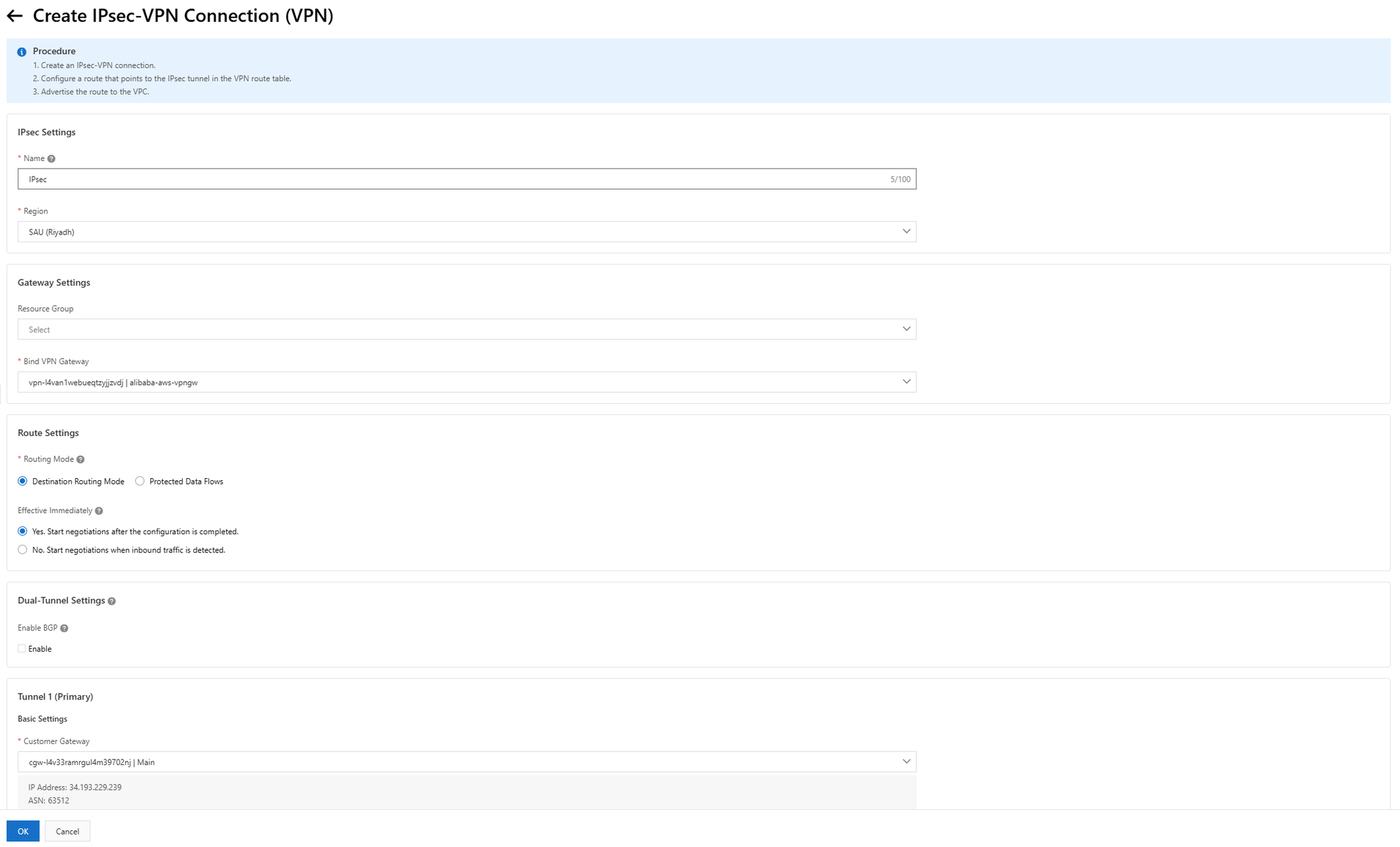
Creating the Alibaba IPsec connection bound to the VPN gateway, with destination routing mode
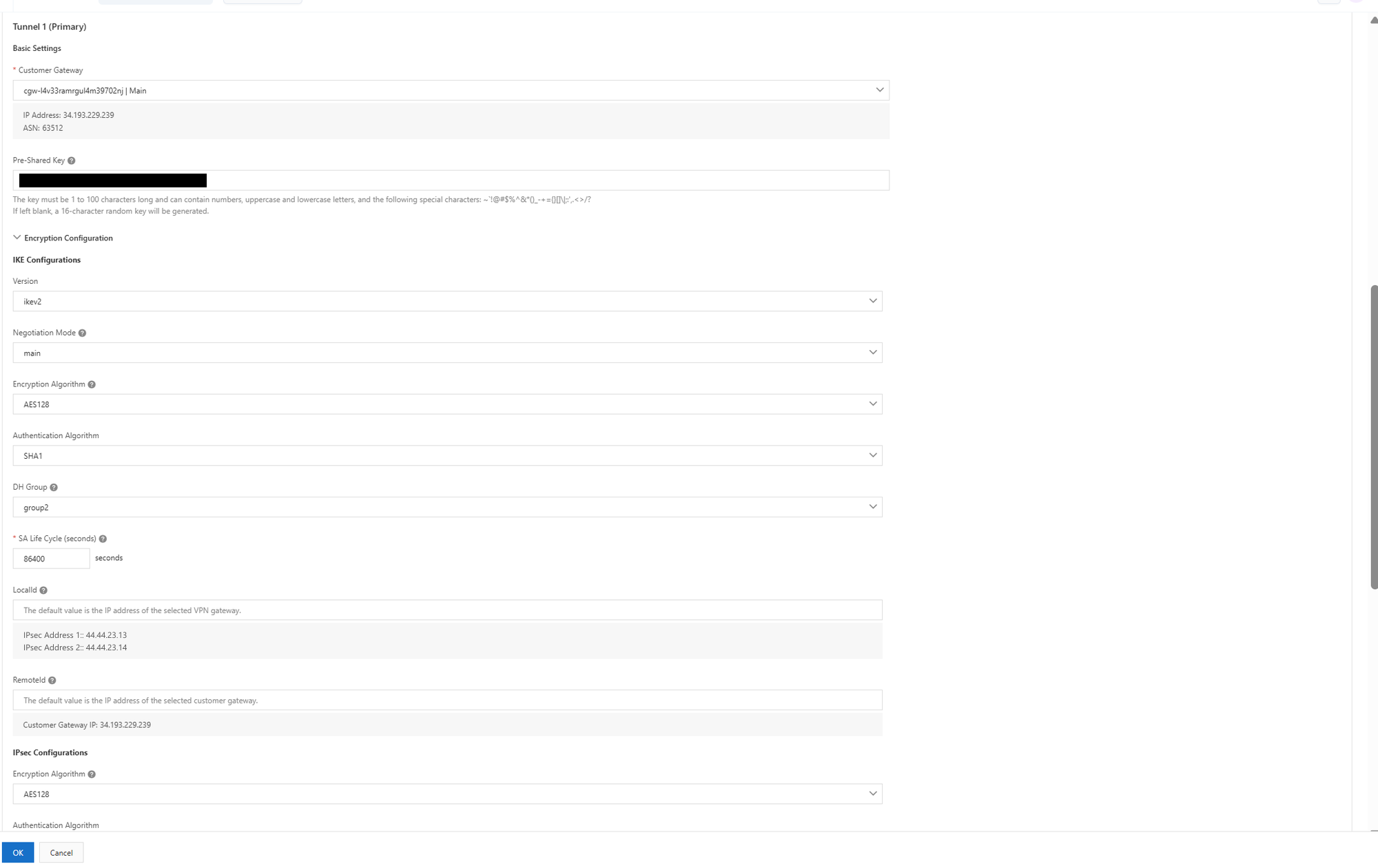
Copy the encryption settings from the AWS configuration file. In my lab:
Encryption working is only half the job. Next, enable BGP on the IPsec connection so the two sides exchange routes. This is where my lab needed real troubleshooting.
What I saw
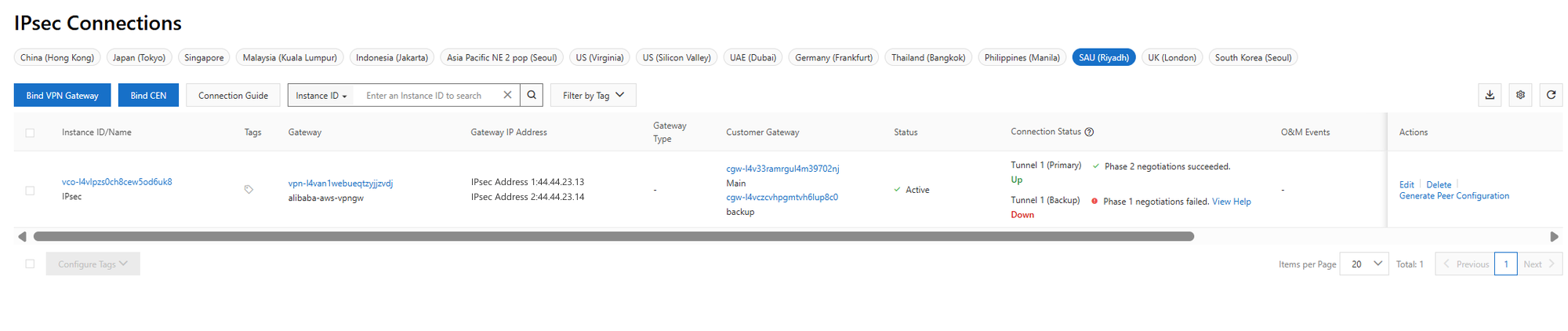
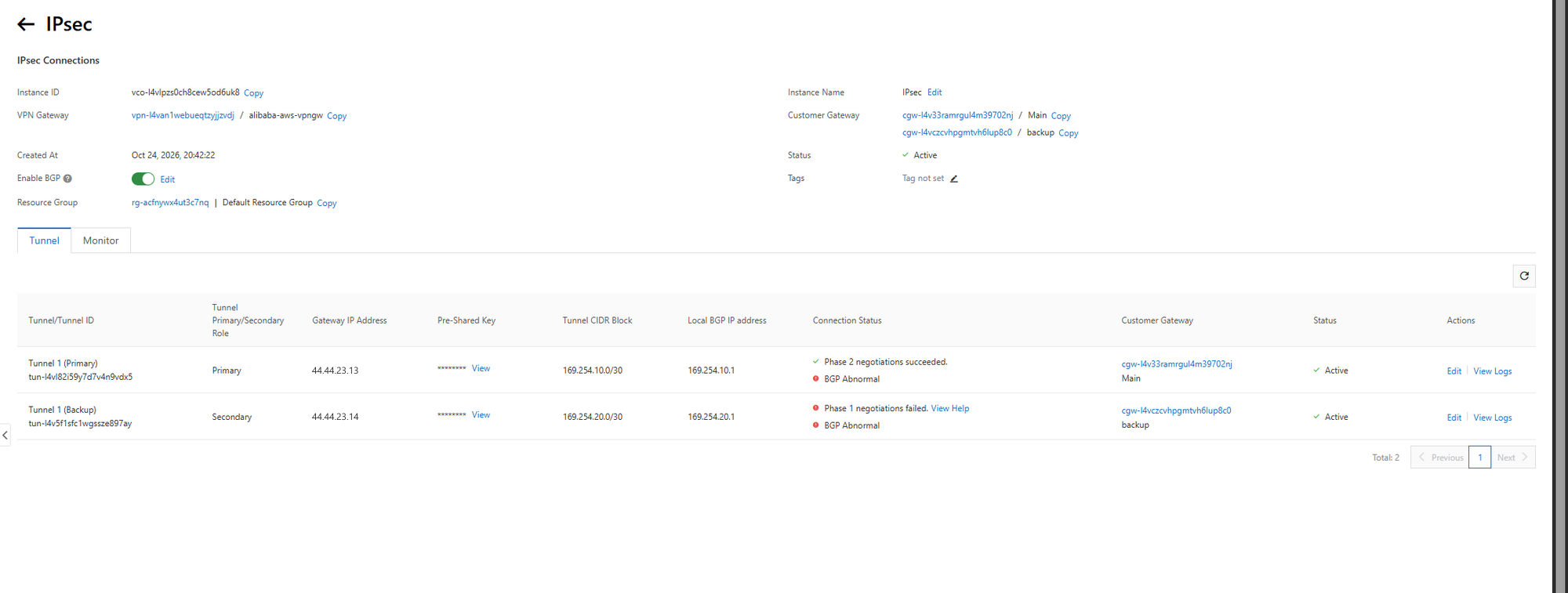
Phase 2 succeeded, but BGP stayed abnormal:
Tunnel 1: phase 2 succeeded but BGP abnormal, with tunnel CIDR 169.254.10.0/30 and local BGP IP 169.254.10.1
Two separate problems were hiding here.
Problem 1: the inside CIDR did not match. Alibaba used 169.254.10.0/30 (local IP .1), but AWS had assigned tunnel 1 169.254.151.240/30. Both sides must use the same /30, and AWS always takes the first usable IP (.241), so Alibaba must use .242.
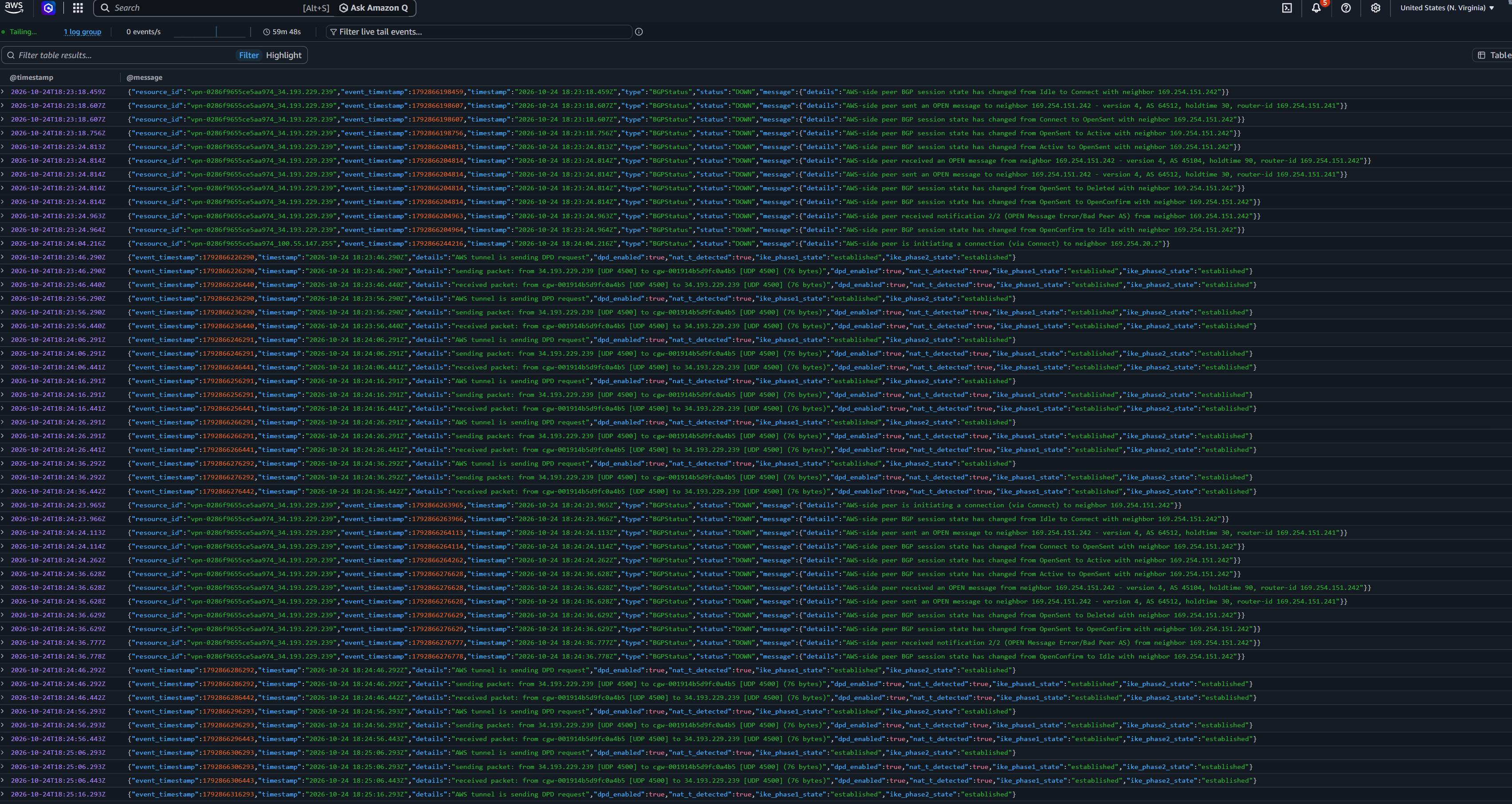
Problem 2: the ASN did not match. The AWS BGP logs in CloudWatch show the exact error. AWS receives an OPEN message from Alibaba (AS 45104), sends its own (AS 64512), and then the session is rejected with OPEN Message Error/Bad Peer AS, again and again:
AWS CloudWatch BGP logs: the session goes Connect, OpenSent, OpenConfirm, then receives OPEN Message Error/Bad Peer AS and drops back to Idle, while the DPD logs show the IPsec tunnel itself is established
"Bad Peer AS" means one side is told to expect a different ASN than the one the other side announces. My Alibaba customer gateways said 63512, but AWS announces 64512. The same logs also show ike_phase1_state and ike_phase2_state as established with DPD working, which proves the encryption was fine and the problem was only BGP.
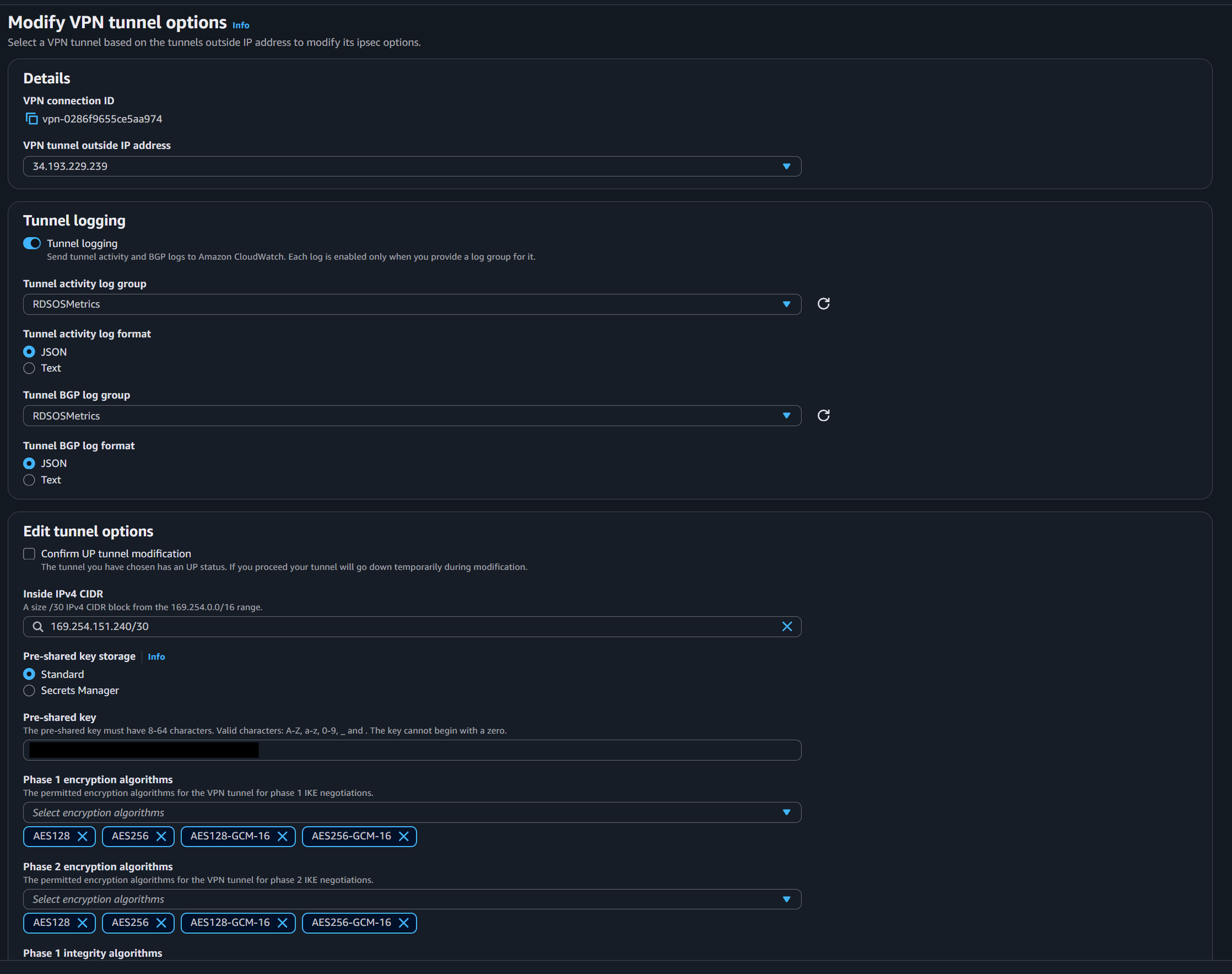
On the AWS side, Modify VPN tunnel options shows the inside CIDR and lets you turn on tunnel logging, which is where these logs come from:
Customer gateways: create them again with the correct ASN 64512, and switch the IPsec connection to them.
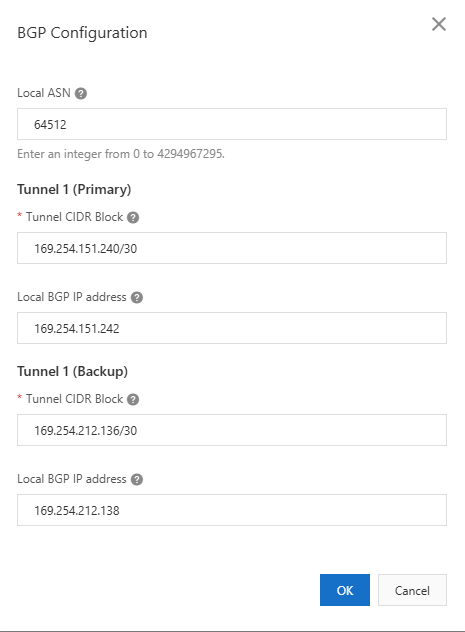
BGP configuration: use the tunnel CIDR that AWS assigned (169.254.151.240/30) and the second usable IP as Alibaba's local BGP IP (169.254.151.242). The local ASN must be the ASN on the AWS customer gateway (45104).
Alibaba BGP configuration with tunnel CIDR 169.254.151.240/30 and local BGP IP 169.254.151.242 for the primary tunnel
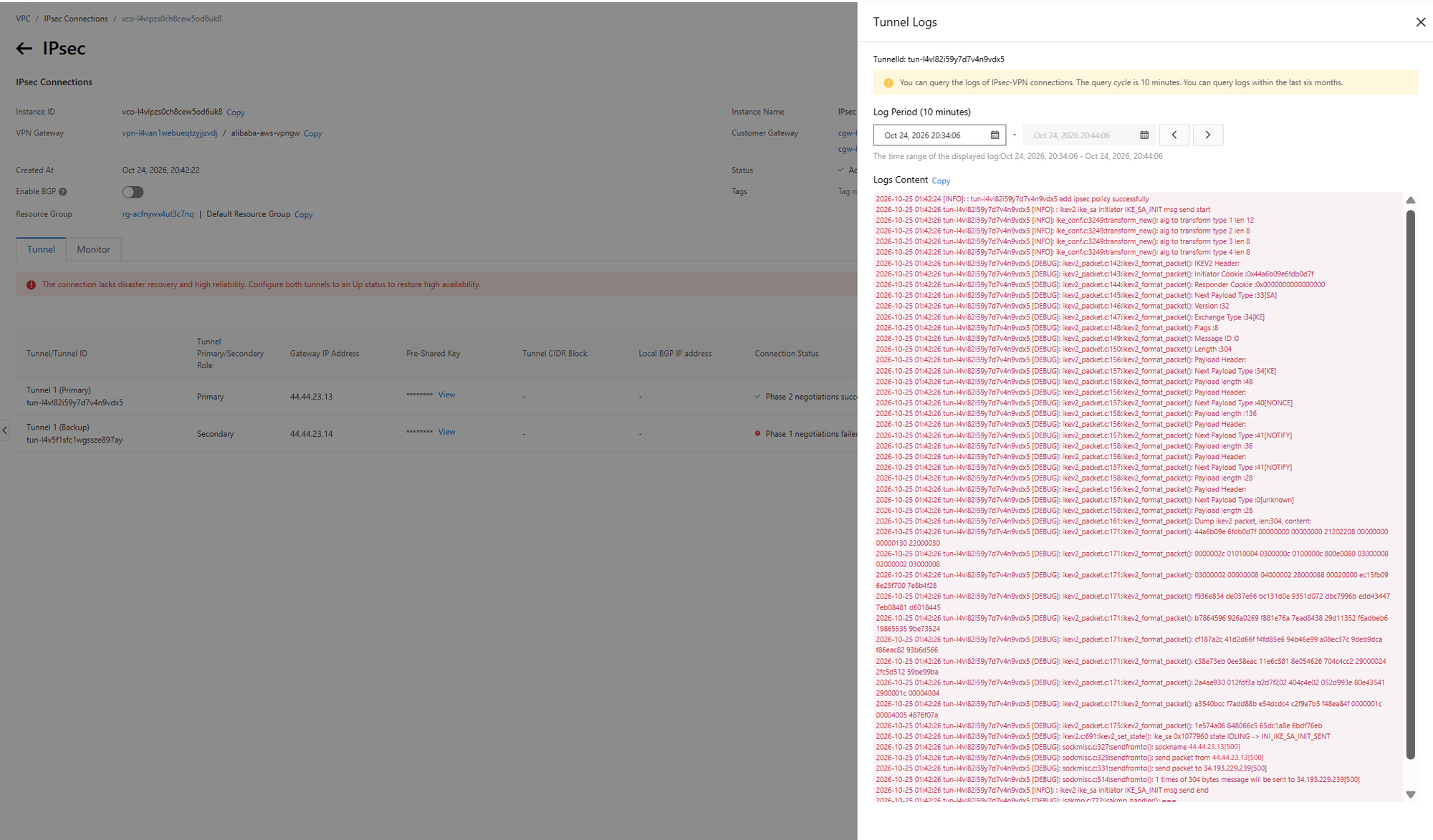
The Alibaba tunnel logs (View Logs) are useful too: they show the IKEv2 exchange between Alibaba and AWS tunnel 1:
Alibaba tunnel logs: IKEv2 SA_INIT exchange sent from 44.44.23.13 to AWS tunnel 1 at 34.193.229.239
Troubleshooting checklist from my lab
Verify inside IPv4 CIDR alignment. The link-local /30 must match exactly on both providers, and the local and remote peer IPs must not be inverted or crossed between the tunnels: AWS takes .1 of the /30, the customer side .2.
Resolve peer ASN mismatches. A Bad Peer AS error drops the BGP handshake. Make sure the Alibaba customer gateway targets the AWS ASN (64512 by default) as its remote neighbor, and that Alibaba's local ASN matches the ASN on the AWS customer gateway.
Isolate the layer. Check the DPD and IKE logs first. If IPsec phase 2 is stable while BGP keeps looping through Connect and Active, the tunnel is fine and the problem is BGP itself: wrong ASN, wrong neighbor IPs, or BGP traffic (TCP port 179) not getting through.
Read both sides' logs. AWS CloudWatch tunnel and BGP logs, and Alibaba View Logs on each tunnel.
Tunnel 2 needs its own AWS VPN connection. An AWS VPN connection has one customer gateway IP, and both AWS tunnels terminate on it. Alibaba's dual tunnel uses two different IPs (44.44.23.13 and 44.44.23.14), so for full redundancy you need a second AWS customer gateway and VPN connection for 44.44.23.14. That is why the backup tunnel's phase 1 fails in this lab.
Step 8: Results
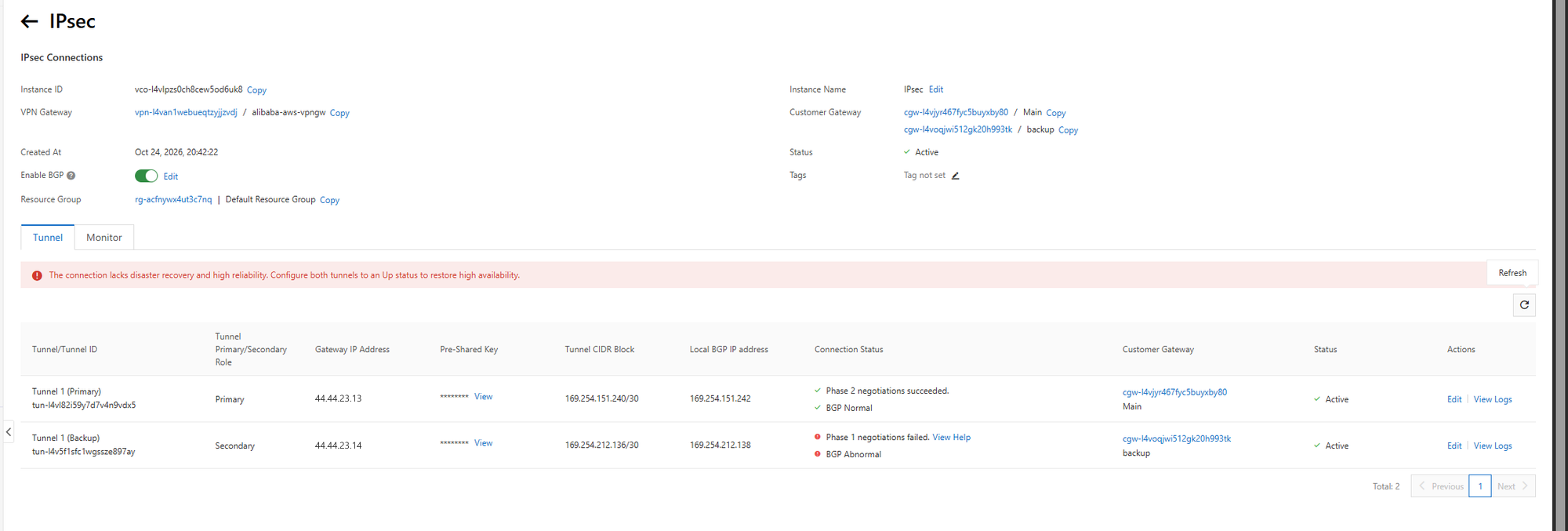
After the fix, Alibaba shows phase 2 succeeded and BGP normal on tunnel 1:
Alibaba IPsec connection: tunnel 1 phase 2 succeeded and BGP normal with tunnel CIDR 169.254.151.240/30 and local BGP IP 169.254.151.242
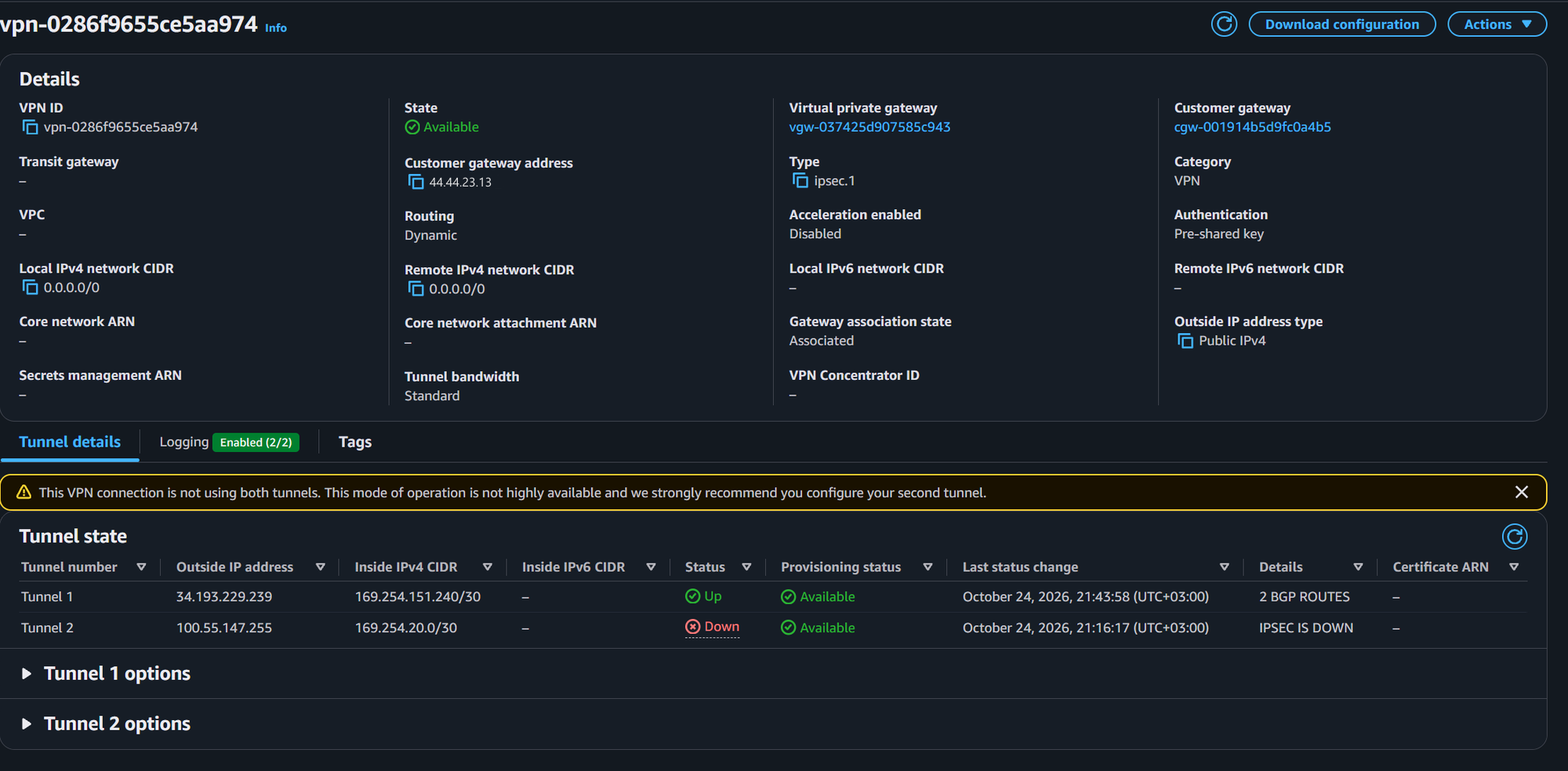
And AWS shows tunnel 1 Up with 2 BGP routes:
AWS tunnel state: tunnel 1 Up with 2 BGP routes, tunnel 2 down
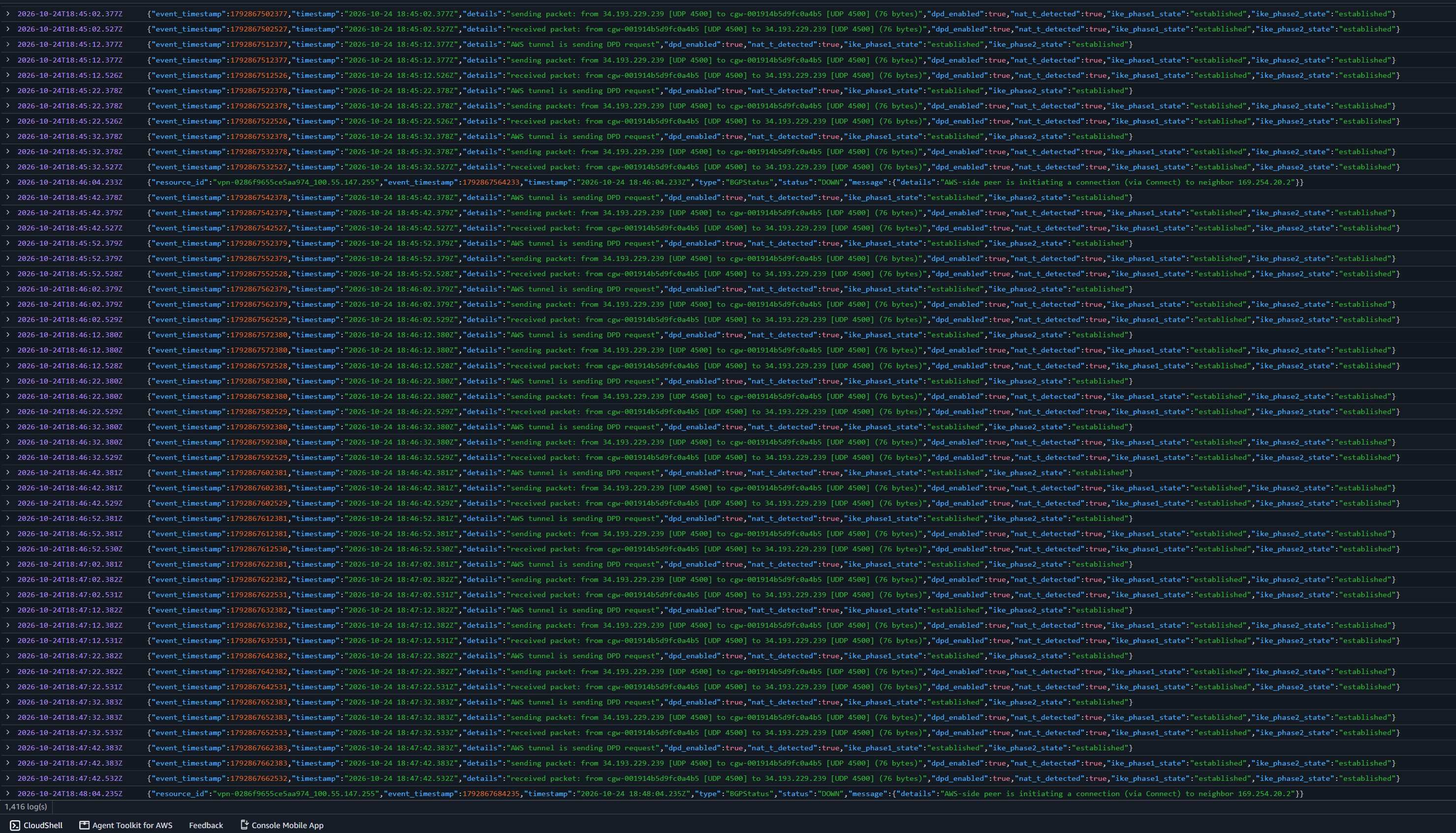
The CloudWatch logs now show a quiet, healthy tunnel: DPD requests answered every 10 seconds, with both IKE phases established:
AWS CloudWatch logs with the tunnel up: DPD requests and replies every 10 seconds, phase 1 and phase 2 established
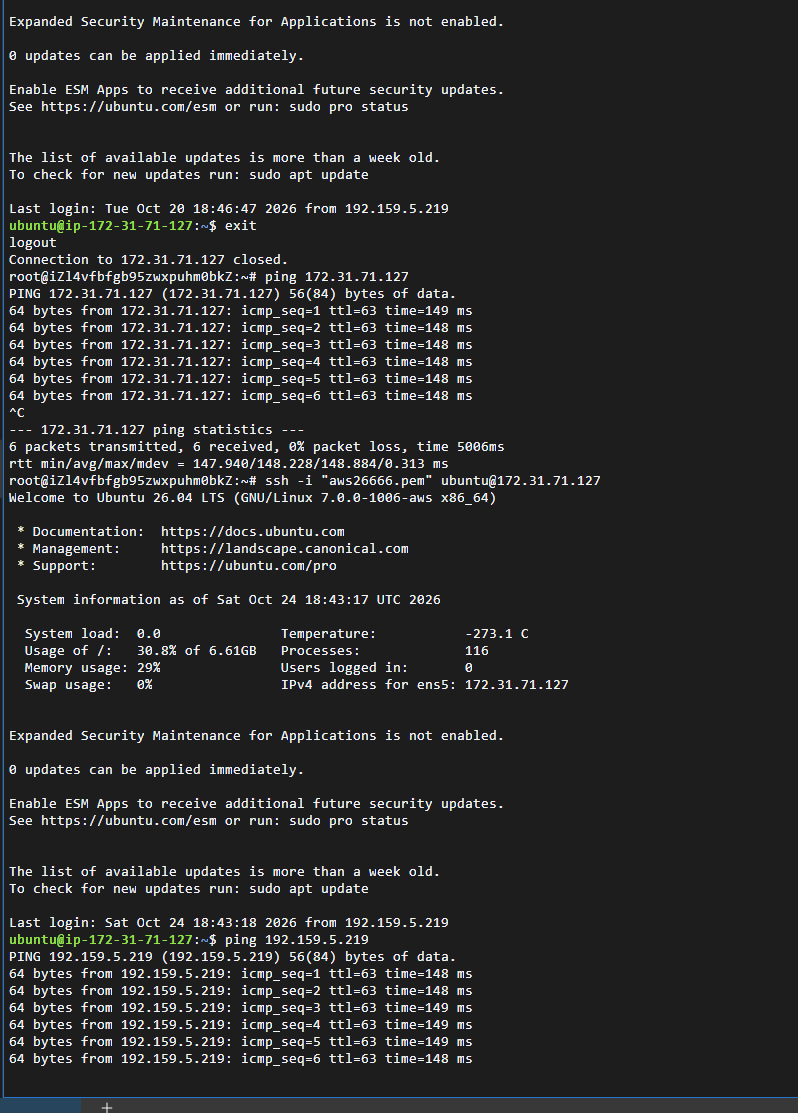
Before testing, make sure the routes reach the VPCs. On AWS, enable route propagation for the virtual private gateway (or add the Alibaba CIDRs pointing to it). On Alibaba, the routes learned over BGP must be advertised to the VPC (the VPN gateway's automatic route advertisement), or add VPC routes pointing to the VPN gateway. Security groups and network ACLs work exactly as in my first lab.
Ping from the ECS to the EC2 with 0% loss, SSH into the EC2 over its private IP, and ping back to the ECS
0% packet loss in both directions, about 148 ms from Riyadh to N. Virginia, and SSH over private IPs only. The TTL is 63, compared with 60 to 62 in the Transit Router lab: the direct path has fewer hops.
Conclusion
Terminating the VPN directly on a VPC is the simplest way to connect one Alibaba Cloud VPC to AWS. The order is clean (Alibaba VPN gateway, then the AWS side, then the Alibaba IPsec connection), and the hard part is the same as always: BGP details. One wrong digit in an ASN and one mismatched /30 kept my tunnel encrypted but useless until the logs on both sides showed exactly what was wrong. If you later need more VPCs, regions or a firewall in the path, that is the moment to move to a Transit Router.